

Time theft happens every time an employee gets paid for hours they didn’t actually work — whether that’s a coworker clocking in for someone running late, or ten extra minutes tacked onto a lunch break.
Time theft costs US employers billions each year, and in frontline environments where labor runs 70–85% of operating costs, those losses hit the budget fast. But most of it isn’t malicious, just an issue of rounding, forgetting, and blurred lines around the clock.
This guide breaks down the most common forms of time theft at work, how to spot it, and what actually stops it, starting with a clear definition.
What is time theft?
Some call it stealing company time. Others call it time clock fraud, time theft at work, or stealing time from work. Whatever the label, it comes down to the same thing: hours on the clock that don’t match hours actually worked. That includes deliberate acts, like falsifying a timesheet or clocking in for an absent coworker, and unintentional ones, like losing track of time on a break or filling out hours from memory.
While some instances are deliberate, many employees don’t realize they’re doing anything wrong. Either way, the cost falls on the organization.
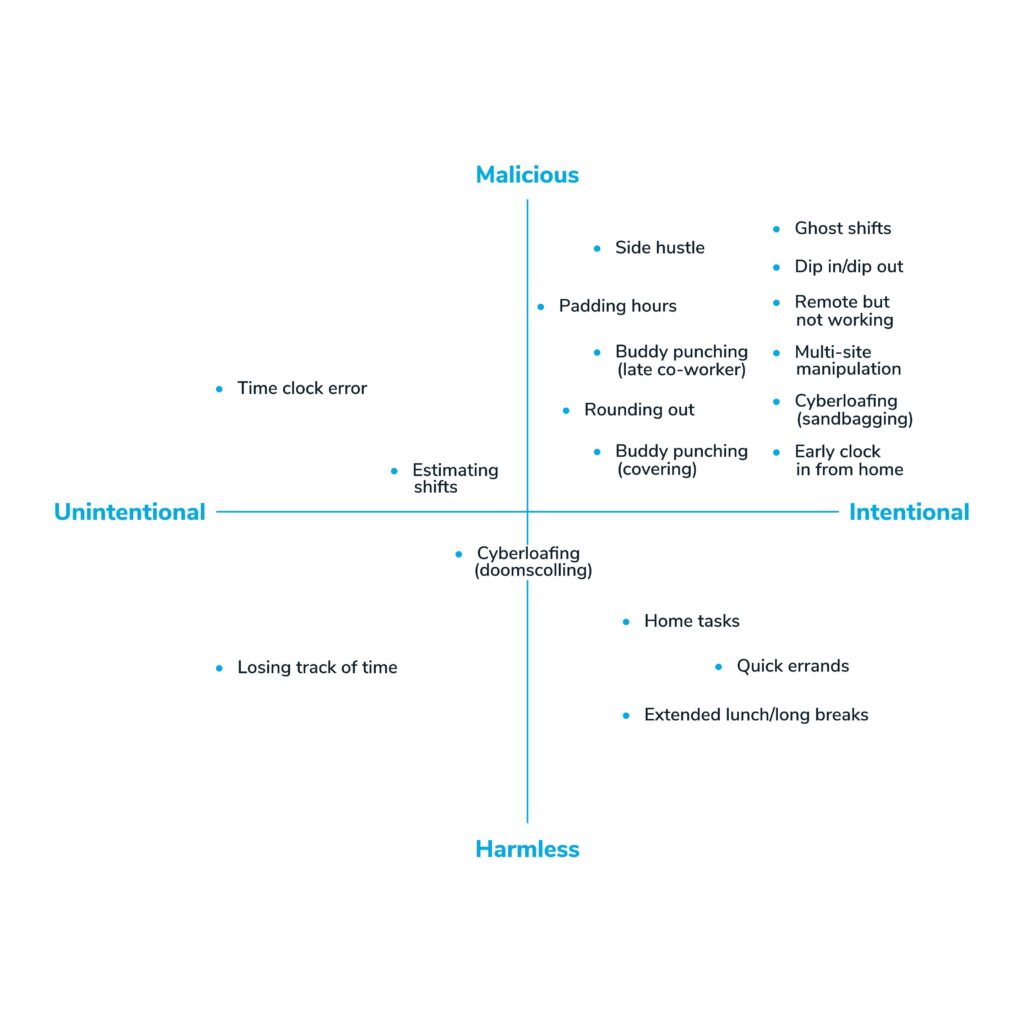
7 types of time theft
It’s impossible to expect employees to spend every second of their working hours on productive tasks. People are people: distractions happen, interruptions are normal, and energy fluctuates. But when reasonable patterns become persistent problems, the organization pays for it. Here are seven types of time theft to know:
1. Buddy punching
One of the most common forms, buddy punching occurs when an employee clocks in for a coworker who is late, absent, or forgot their credentials. It’s not always malicious. Employees often see it as helping a friend. But it’s one of the clearest forms of time fraud. It’s especially easy with older punch card systems that don’t tie a clock-in to a specific individual.
Examples:
- Clocking in for a coworker stuck in traffic or dealing with a personal urgency
- Clocking someone out at the scheduled time when they left early
- Clocking in for someone present but who forgot their badge or credentials
2. Extended breaks or lunches
Breaks are essential to working efficiently; some union collective bargaining agreements require them. But taking an extra 10–15 minutes to get back to work adds up. Extended breaks are especially common without time clocks to hold teams accountable, and while each incident seems minor, the cumulative loss across weeks and months is significant.
Examples:
- Taking a longer break unintentionally due to distraction or fatigue
- Consistently going over meal break time without recording it
- Taking extended coffee breaks because the culture quietly permits it
3. Cyberloafing
Cyberloafing (scrolling social media, shopping online, or other personal internet activity during work time) is rarely intentional. It usually starts as a quick mental break and turns into something longer. Without a reliable time tracking system, employees have fewer natural checkpoints to keep themselves on task.
Examples:
- A 2-minute social media check that turns into a 20-minute stretch
- Watching videos or playing games while appearing to work
- Deliberately slowing down on tasks to fill time with personal browsing
4. Ghost shifts
Ghost shifts are among the most serious types of time theft. They occur when an employee is clocked in (typically through buddy punching, remote access, or auto-punch) but isn’t physically present or actively working. In more severe cases, managers or payroll staff may fabricate hours for employees in exchange for favors. Ghost shifts typically surface where scheduling and time tracking systems aren’t connected.
Examples:
- Clocking in and out without being present at the worksite
- Logging in via a mobile app but remaining clearly inactive
- Being automatically clocked in due to a scheduling software error
5. Inflating work hours (timesheet falsification)
Manual and online timesheets both create opportunities for falsification. Without automated time capture, employees estimate their hours, and that estimation tends to round in their favor. An employee who leaves at 4:45 but records 5:00 may not see it as theft. Over time, even small discrepancies accumulate into significant overpayment.
Examples:
- Reporting a 5:00 p.m. clock-out when leaving at 4:45
- Filling out timesheets from memory and erring on the side of more hours
- Reducing recorded break time to inflate total hours worked
6. Personal activities
Quick personal calls or texts during work hours are generally tolerated and cause minimal disruption. The problem is scale and frequency, especially for remote, over-the-road, or multi-site employees who don’t have the same visibility or structure as on-site staff. Without automated time tracking, it’s easy for personal time to blend into paid time without anyone noticing.
Examples:
- Running out-of-home errands during work hours and planning to make up time later
- Working a side project or freelance work while on the clock
- Handling household tasks or childcare needs during paid time
7. Misusing mobile clocks
Mobile clocks are a convenience for field employees and multi-site teams, but they introduce a challenge: it’s hard to verify where an employee actually is when they clock in. An employee might be clocking in from a location that isn’t their assigned worksite, or even while commuting. Without geofencing and geolocation capabilities, this type of time theft is difficult to spot and harder to prove.
Examples:
- Logging time before beginning actual work, while still at home or in transit
- GPS drift registering an employee at the work location despite them being elsewhere
- Using location flexibility to claim hours at one job site while working at another
Why employees commit time theft
Most people don’t wake up planning to steal time from their employer. Root causes tend to repeat across teams, and they’re usually more about environment than character.
- Low morale or a sense of unfair treatment – When employees feel undervalued or believe pay and scheduling decisions are unfair, cutting corners on time starts to feel justified.
- Unclear expectations – Without a documented policy, employees genuinely don’t know where the line is between a quick personal errand and time theft.
- Tool confusion – Manual timesheets and clunky clock-in processes create honest mistakes that look identical to intentional fraud.
- Burnout and fatigue – Overworked employees are more likely to pad breaks or slow down, not out of dishonesty, but exhaustion.
- Peer influence – When time theft goes unaddressed on a team, it normalizes fast. New hires pick up the same habits within weeks.
Understanding the why doesn’t excuse the behavior, but it changes how you respond. A policy gap gets fixed with training. A morale problem doesn’t get fixed with a bigger penalty.
How to detect time theft
Before you can address time theft, you need to know it’s happening. Four detection methods work well across most organizations:
Exception reporting and anomaly alerts
Time tracking software flags deviations from expected patterns: late clock-ins, early departures, clock-outs that don’t align with scheduled end times. Reviewing exception reports before each payroll cycle lets managers catch issues while corrections are still straightforward. Some systems automatically alert supervisors when an employee clocks in significantly early or late without approval.
Output-to-time comparison
Compare time recorded against measurable output for the role: calls made, units produced, jobs completed, or similar markers. When recorded hours consistently outpace output, that’s a signal that time isn’t being used as reported. This approach works especially well in roles with defined production rates or volume-based work, and it catches patterns that pure timekeeping data might miss.
Geofencing and geolocation logs
Geofencing restricts clock-in access to a defined physical zone around a worksite. Geolocation logs the employee’s position at each clock operation. Together, they confirm that remote or field staff were on-site when their time was recorded, without continuous location monitoring. TimeClock Plus only captures location during clock operations, not between them, which matters for employee trust and adoption.
Audit trail review
A complete audit log records every timesheet edit: what changed, who changed it, and when. Reviewing audit trails regularly, particularly for employees with recurring adjustments or consistent rounding in one direction, surfaces patterns that distinguish honest error from intentional time clock fraud.
Consequences of time theft for your organization
Time theft affects the organization’s finances, productivity, culture, and legal standing. It also carries real consequences for the employees who commit it.
Financial losses
Small daily increments compound fast.
Say the average time theft per employee is 10 minutes per day — this might not seem like enough to worry about, right? But the time theft per year per person would be roughly 41 hours or around a week’s wages. For every 50 people on your team committing time theft daily, you’re paying enough empty wages for one full-time employee.
Reduced productivity
Lost hours affect output directly. Equally important: employees who aren’t gaming the system absorb the slack, which adds to their workload, increases frustration, and degrades output over time.
Morale and cultural erosion
Employees who work honestly notice when others don’t. When time theft goes unaddressed, the unspoken message is that it’s tolerated. That perception spreads, creating disengagement, undermining trust in leadership, and normalizing behavior that costs the organization.
Compliance and legality
Inaccurate time records don’t just affect payroll. They create legal exposure. Under the Fair Labor Standards Act, employers must maintain accurate records of hours worked each day and workweek. Wage and hour violations from recordkeeping failures can reach six- to seven-figure liabilities in audits, fines, and back-pay obligations. (U.S. Department of Labor)
Consequences for employees
Time theft carries real consequences for the employee as well. Organizations typically apply a progressive approach:
- Verbal warning – First response for minor or first-time incidents
- Written warning – Documented escalation with a clear record of the behavior and expected correction
- Termination – Appropriate for intentional, ongoing, or large-scale theft
- Legal action – Civil suit or criminal prosecution for significant, deliberate fraud
Secondary effects: reduced job security, loss of trust with supervisors and colleagues, and reputational damage that can affect future employment.
How to prevent time theft
Preventing time theft takes more than a policy on paper. It requires clear expectations, consistent enforcement, and the right tools.
What to include in a time theft policy
A time theft policy should cover five core components:
- Defined behaviors – List specific covered acts: buddy punching, extended breaks without recording, timesheet padding, personal activities during paid time, and clocking in from unauthorized locations.
- Scope – Apply consistently to hourly and salaried employees, remote and on-site staff alike.
- Progressive discipline – Specify the response at each level: verbal warning, written warning, termination, and when legal action may follow.
- Documentation requirements – Managers who adjust submitted timesheets should obtain employee acknowledgment of any changes.
- Review cadence – Revisit the policy when the workforce changes significantly or when labor laws are updated.
Include examples of both intentional and unintentional time theft to reduce gray areas. Make the policy accessible in shared workspaces, onboarding materials, and your employee handbook.
Enforce the policy
Even the clearest policy is ineffective without follow-through. Apply disciplinary action consistently across all roles and teams. Document every incident and outcome to protect the organization if a dispute arises. When the intent behind a time theft incident isn’t clear, coaching often works better than immediate discipline, uncovering root causes like tool confusion, unclear expectations, or cultural norms that have quietly taken hold.
Build accountability into the culture
Policies set the rules; culture determines whether they hold. Reinforce expectations through regular communication. Recognize teams that submit accurate, error-free timesheets. Lead by example. Make it clear that every hour matters, not just for cost control, but for the work the team delivers together. Assume good intent, and verify it with technology.
Train your team
Put the policy front-of-mind during onboarding, not just in paperwork employees sign and forget. Reinforce it in periodic team meetings. Cover the why alongside the what: accurate time records protect everyone: payroll accuracy, labor compliance, and the trust that makes a team function well.
Use time tracking software
A proactive time tracking strategy is your organization’s most effective prevention layer. Automated time clocks remove the opportunity for many forms of time theft. When employees have straightforward tools that make accurate time tracking easy, accidental errors drop and intentional falsification becomes harder to sustain.
Key capabilities to look for:
- Biometric time clocks – Fingerprint or facial recognition prevents proxy clock-ins (available in TimeClock Plus)
- Geofencing – Restricts mobile clock-ins to designated work zones
- Geolocation logging – Records employee location at each clock operation without continuous tracking
- Automated exception alerts – Flags anomalies before payroll runs
- Audit logs – Every timesheet edit is timestamped and attributed to the user who made it
- Scheduling sync – Employees can only clock in for scheduled shifts, blocking ghost clock-ins
Involve employees in the rollout. When teams understand why these tools are in place and see that the controls apply consistently, adoption follows more naturally.
Privacy and mobile time tracking
Mobile time tracking raises understandable questions about employee privacy. TimeClock Plus only captures an employee’s location during clock operations — not when the app is open but inactive, and not between shifts. Employees aren’t tracked continuously. That distinction matters for trust and adoption, particularly for remote and field teams.
Time theft prevention by type
General policy and time tracking software address time theft broadly. For specific types, targeted tactics are more effective.
How to prevent buddy punching
- Use biometric time clocks – Fingerprint or facial recognition ties each clock-in to one individual, making proxy punching technically impossible.
- Require individual logins – Separate credentials are the first line of prevention; shared credential patterns surface in audit logs.
- Conduct regular audits – Look for identical clock-in patterns across employees or location changes without documentation.
How to prevent extended breaks
- Set break thresholds in time tracking software – Automatic reminders prompt employees to clock back in after breaks; alerts trigger when time exceeds the set limit.
- Create a culture of early check-ins – A low-key accountability conversation when a pattern first appears works better than a delayed escalation after the behavior has been sustained.
How to prevent cyberloafing
- Define acceptable use policies – Communicate clearly which sites and apps are permitted on work devices during work hours.
- Create phone-free and phone-friendly zones – Break rooms vs. desks; for remote teams, encourage physical separation from personal devices during work hours, or co-working sessions for added accountability.
How to prevent timesheet falsification
- Automate time collection – Replace manual entry with digital clocks or mobile apps that record exact times; removing manual entry removes the primary opportunity to round up.
- Enable audit trails – Every edit is logged with the author and timestamp.
- Cross-check regularly – Compare timesheets against schedule data, location logs, or project output to confirm consistency.
How to prevent time wasted on personal activities
- Define personal time boundaries – Clarify what counts as acceptable use during work hours vs. what crosses the line; include remote work scenarios.
- Offer flexibility where the role allows – Giving employees appropriate autonomy over their time reduces the tendency to blur personal and professional time.
- Use location-based systems – GPS tracking within time and attendance software reduces uncertainty about where employees are and when.
How to prevent ghost shifts
- Connect scheduling and time tracking – When employees can only clock in for scheduled shifts, unauthorized clock-ins stop.
- Use real-time visibility tools – Time clocks, badge readers, biometric scanners, web clocks, and mobile app clocks let managers see who is clocked in and where at any point in the shift.
- Limit manual processes – If non-biometric methods are necessary, restrict the number of permitted transactions per shift and flag exceptions.
How to prevent mobile clock misuse
- Use geofencing – Create designated work zones and restrict clock access to within those boundaries.
- Enable geolocation logging – Record clock-in and clock-out locations without continuous tracking.
- Configure role-based permissions – Limit mobile clock access to roles tied to specific locations; adjust capabilities based on employee type and work arrangement.
Frequently asked questions about time theft
What is time theft?
Time theft occurs when employees are paid for time they did not actually work, through intentional acts like falsifying timesheets or buddy punching, or unintentional ones like extended breaks or estimating hours from memory.
Is time theft illegal?
Time theft is not a standalone federal crime. Most workplace cases are handled as civil employment misconduct, addressed through discipline or termination. Intentional, large-scale time theft can be prosecuted under state law when amounts cross applicable felony thresholds. There are no federal laws that directly prohibit it as a criminal act; it’s typically treated as employee misconduct.
Is time theft a felony?
Not automatically. Time theft is typically treated as a civil employment matter. It can escalate to a felony charge when intentional and when the dollar amount meets the applicable state threshold, usually $500–1,000+ depending on the state.
Can an employee be terminated for time theft?
Yes. Employees who falsify timesheets or engage in intentional time theft may be subject to disciplinary action, up to and including termination, where appropriate. Consult legal counsel before acting on documented cases to confirm the process aligns with applicable employment law.
What should a time theft policy include?
A sound time theft policy defines covered behaviors specifically, applies consistently to all employee types and work arrangements, outlines a progressive discipline process, specifies documentation requirements for any timesheet adjustments, and includes a review cadence tied to workforce changes or labor law updates.
How does time tracking software prevent time theft?
Automated time tracking removes the opportunity for many forms of theft. Biometric clocks prevent buddy punching. Geofencing restricts where employees can clock in. Exception alerts flag anomalies before payroll runs. Audit logs create a documented record of every timesheet change, including who made it and when.
Time tracking software to prevent time theft
Accurate time and attendance software is the most effective layer of time theft prevention because it removes the opportunity, not just the policy prohibition. Here’s how TimeClock Plus maps to the most common time theft scenarios:
| Time theft challenge | TimeClock Plus capability |
| Buddy punching | Biometric time clocks – fingerprint or facial recognition ties each clock-in to one individual |
| Ghost shifts and remote fraud | Scheduling sync – employees can only clock in for scheduled shifts |
| Mobile clock misuse | Geofencing and geolocation logging – clock-ins restricted to designated work zones |
| Timesheet falsification | Automated time collection and audit logs – every edit is timestamped and attributed |
| Pattern detection and anomaly review | Exception reporting and real-time dashboards – flags deviations before payroll runs |
| Multi-location scheduling and time sync | Humanity Schedule – connects employee scheduling and time data across locations, reducing ghost shift risk from disconnected systems |
TimeClock Plus time and attendance software has the flexibility to fit your organization and your employees, from multi-site retail and healthcare operations to public safety agencies running 24/7 rotational schedules.
It safeguards accurate records, helps prevent time theft, and supports compliance with laws, CBAs, and internal policies that reinforce proper working conditions. Time tracking software is much faster, easier, and less compromising than manually entering, collecting, reviewing, and finalizing timesheets.
With an effective policy backed by automated time and attendance software, you’ll have everything you need to stop time theft before it occurs.
TCP Software’s employee scheduling and time and attendance solutions have the flexibility and scalability to suit your business and your employees, now and as you grow.
From TimeClock Plus, which automates even the most complex payroll calculations and leave management requests, to Humanity Schedule for dynamic employee scheduling that saves you time and money, we have everything you need to meet your organization’s needs, no matter how unique. Plus, with Aladtec, we offer 24/7 public safety scheduling solutions for your hometown heroes.
Ready to learn how TCP Software takes the pain out of employee scheduling and time tracking? Speak with an expert today.




 Link copied!


