
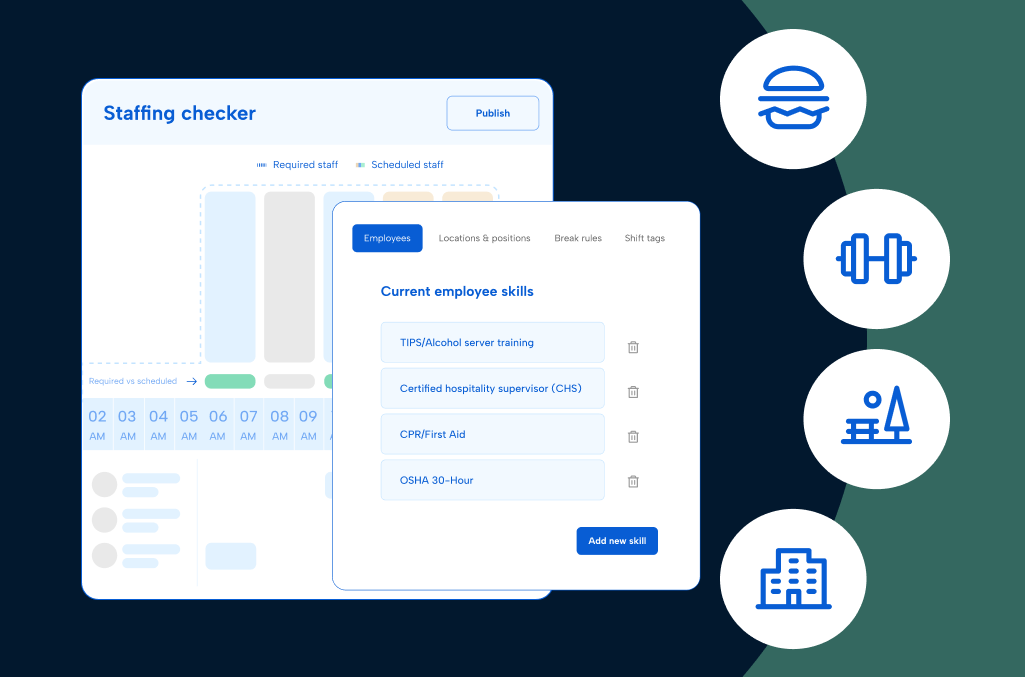
Staff scheduling software for hospitality helps you decide who works which shift, role, and location, then keeps that plan current as guest demand changes by the hour.
Get it right, and nobody thinks twice. Get it wrong, and guests notice immediately, in a stalled dinner rush, an empty lifeguard chair, or a client call that rings through to voicemail.
A restaurant general manager is redrawing tonight’s floor plan an hour before service because a shift swap never made it into the schedule.
A hotel’s front office director can’t say who’s staffing the desk during a big group check-in, because three departments build their schedules three different ways.
A theme park operations lead needs a specific certification for a specific ride platform right now and has no quick way to confirm who holds it.
A travel agency owner is watching after-hours client calls go unanswered because nobody’s schedule accounts for work outside normal booking windows.
Different settings, same underlying problem. The plan on paper doesn’t match the shift that actually happens.
This guide is for operations, HR, payroll, and finance leaders across food and beverage, travel and accommodations, and entertainment and recreation, whatever your starting point looks like right now. Maybe your shifts still live in a spreadsheet. Maybe your team outgrew its current scheduling tool, or you’re bending an enterprise solution to fit hospitality’s realities. Wherever you’re starting from, the aim here is to help you figure out what to look for next.
What is hospitality employee scheduling software?
Hospitality employee scheduling software builds, publishes, and adjusts staff schedules for restaurants, hotels, travel services, and entertainment venues. It matches coverage to guest demand, tracks roles and credentials, applies labor rules, and lets staff view schedules, swap shifts, and pick up open shifts from a mobile app.
A general employee scheduling app handles the basics. Software built for hospitality goes further, because one person may work three roles in a day and demand can double between lunch and dinner.
What’s in this guide
This guide covers:
- Why scheduling works differently in hospitality
- The core capabilities and labor metrics to look for in a scheduling solution
- How to evaluate hospitality employee scheduling software vendors
- The questions worth asking before you sign anything
- What scheduling software saves you, and what it costs without it
- Answers to common questions about hospitality scheduling software
Why scheduling is different in hospitality
Staffing patterns in hospitality rarely repeat themselves two days in a row. People move through roles, stations, and locations before a single shift ends. Layer on credential rules, labor law, and hour-by-hour swings in guest demand, and the schedule gets complicated fast.
Some of what follows applies no matter which corner of hospitality you’re in. In that case, the roles below share a section. Where the pressure is specific to one setting, that setting gets its own section.
Operations and department leaders
A restaurant general manager, a hotel director of operations, and a recreation center manager don’t share a title, but they run into the same wall. The plan they published on Monday rarely survives contact with Wednesday. A slow lunch turns into a packed patio. A block of rooms checks in three hours early. A youth swim program doubles in size overnight, and whoever’s running the floor has to react to demand that a fixed schedule never saw coming.
You own the guest or member experience and the labor line that funds it, yet the schedule you built last week is a step behind what’s happening on the floor today.
When the plan can’t flex, coverage gaps go unnoticed until a guest feels them, overtime creeps in without an early warning, and whoever’s on shift ends up rebuilding the plan instead of running the room.
Timing makes it worse. Without a shared view of labor next to sales, transactions, and guest traffic, a manager may not learn that a shift ran heavy until the numbers land the next day. By then, the money’s gone.
HR, payroll, and workforce administration
Across food and beverage, travel and accommodations, and entertainment and recreation, HR and payroll teams end up owning the fallout from every scheduling mistake. Pay rates, credential requirements, minors’ rules, and labor laws that vary by location must hold up on every shift, with no room for a manager to guess and hope it’s close enough.
Predictive scheduling adds another layer. Cities and states such as New York City, Chicago, Seattle, and Oregon have Fair Workweek or predictive scheduling laws that cover many hospitality employers. Under those rules, a late schedule change can mean premium pay owed to the employee, so HR needs a clear record of when each schedule posted and what changed.
If you don’t build compliance into the schedule from the start, HR spends its time explaining what went wrong instead of catching it beforehand.
Multi-site and regional leadership
Running labor across multiple properties, restaurants, or facilities means treating it as a shared resource rather than a set of separate local decisions. That takes comparing coverage and overtime trends site by site and knowing where staffing consistently comes up short.
When each location schedules its own way, that comparison falls apart, and leadership ends up steering by each site’s local habits instead of real performance.
A view that puts sales, transactions, and guest counts next to labor hours by site shows which location runs efficiently and which one needs a closer look, without waiting for month-end reports.
FOH and BOH managers (food and beverage)
The floor plan never holds still for long. A host works the door, then bounces to tables the moment the room fills up. A bartender jumps in to run food during a rush. Every one of those shifts has to land somewhere in the plan, or whoever builds tomorrow’s schedule is starting from a picture that’s already out of date.
The kitchen has its own version of the same issue. Line cooks and prep staff rotate through stations as ticket volume rises and falls, and getting required meal and rest breaks in during a rush takes real coordination. Split shifts are common, too, with a lunch push, a slow afternoon, and a dinner surge all in the same day. When the schedule doesn’t reflect who’s covering which station, managers end up patching holes mid-shift instead of running the kitchen.
Travel advisors and consultants (travel and accommodations)
An advisor’s day rarely fits inside a clean shift. Client time zones, supplier calls, and trip disruptions push work outside normal booking hours, whether the advisor is in the office, at home, or traveling.
When the schedule doesn’t account for that, after-hours coverage lands on the same few advisors again and again, urgent requests crowd out planned admin time, and nobody has a fast way to see who’s free to take a client call.
Housekeeping and facilities (travel and accommodations)
Occupancy swings, early arrivals, late checkouts, and surprise maintenance requests constantly reshuffle the day, often across a mix of full-time, part-time, and outsourced staff. Reassigning people across floors, buildings, and task lists partway through a shift is part of the job.
Maintenance and engineering teams add an on-call layer. A 2 a.m. leak or an HVAC failure during check-in needs a fast response, and the schedule has to show who’s on call, who’s next in the rotation, and how to reach them.
A good scheduling setup should give housekeeping and facilities leaders room to plan ahead of the day, not eat up their week reconstructing what happened after the fact.
Events and banquets (food and beverage, travel and accommodations)
Weddings, conferences, and banquets arrive in bursts. A steady core team may need extra hands for a single weekend, including seasonal or temporary staff who don’t work a regular schedule. Templates that scale up fast, plus a clear record of who worked which event, keep payroll from turning into a round of corrections afterward.
Attractions and park operations (entertainment and recreation)
A ride operator might open one attraction, help run a midday show, and close out an entirely different zone. Seasonal staff rotate through greeter posts, queue management, and cleanup as crowds and weather shift by the hour.
The stakes here go past labor accuracy. A safety-critical post needs a specific person with a specific credential before the gates open, and managers need to confirm that in advance instead of piecing it together after something goes wrong.
Guest services, ticketing, and front desk (entertainment and recreation)
These roles follow guests wherever they end up, not where the schedule assumes they’d be. A ticket scanner fields membership questions as soon as a line backs up. A supervisor steps in behind the counter to keep things moving. Someone stays late, so the last person in line isn’t left standing there.
When the schedule expects fixed posts and clean stop times, all that improvising turns into cleanup work once the week wraps up.
From patching coverage gaps to building a real plan
Across every one of these roles, a handful of questions keep repeating:
“Who can actually cover this right now?”
“Why doesn’t the schedule match what’s happening on the floor?”
“How did we end up short again this week?”
Any one of those is manageable on its own. When you hear them every week, they’re telling you the schedule isn’t keeping pace with how the work flows. Fixing that starts with understanding these pressure points and choosing a solution built around them, not just a calendar with more features.
Core capabilities every hospitality scheduling software should have
A spreadsheet or a shared calendar can get a small team through a week. Neither holds up once you’re running a 24/7 operation with rotating roles, shifting demand, and rules that vary by state, credential, or age.
A restaurant group, a hotel portfolio, and a regional park network all need the same five things from staff scheduling software built for hospitality.
1. Build schedules that match real demand across roles, departments, and locations
In hotels, one person might cover housekeeping in the morning and help with a banquet setup in the afternoon. In the food and beverage industry, a server may run the floor at lunch and support an evening event. In entertainment and recreation, a staff member might scan tickets in the morning and rotate to a ride platform by afternoon.
If your scheduling software only accounts for fixed shifts in fixed roles, you’re planning around a version of your operation that doesn’t exist.
Look for software that:
- Uses historical and seasonal patterns, plus sales, reservation, or occupancy data, to forecast staffing needs by role, outlet, and location
- Builds flexible templates that adjust to occupancy, events, and demand swings
- Flags overstaffed and understaffed periods before the schedule publishes
- Supports role and skill requirements so the right staff land in the right positions
- Splits a single shift into segments, so one person can cover check-in, dining service, and an event without separate entries
- Shows scheduled and worked labor hours next to actual and expected sales, transactions, and guest counts as the week plays out
For food and beverage specifically, look for staffing templates tied to service periods so FOH and BOH coverage tracks meal rushes and event surges rather than following a flat daily plan.
2. Fill open shifts and last-minute callouts fast
A single callout can throw off an entire shift when coverage depends on texts and phone calls. Managers work through a list of names one at a time while a shift sits open, and guests feel the wait.
The right scheduling solution broadcasts an open shift to qualified, available staff automatically, and they claim it from a mobile app instead of waiting for a callback.
Look for software that:
- Notifies eligible staff instantly when a shift opens or you need extra coverage
- Supports auto-fill rules based on skill, credential, seniority, or availability
- Gives managers a consolidated view of coverage gaps and callout trends across the operation
- Keeps a record of who claimed a shift and when, so there’s no confusion after the fact
For entertainment and recreation specifically, auto-fill rules should account for certifications and age restrictions, so an open shift reaches only staff who are qualified and eligible to cover it.
3. Enforce compliance and credential rules automatically
Compliance in hospitality touches every shift: meal and rest breaks, maximum hours, minors’ work restrictions, and, in entertainment and recreation, safety credentials tied to specific roles. When enforcement depends on a manager remembering every rule, mistakes are inevitable, especially during a rush.
The better approach builds those guardrails into the schedule itself and catches a problem before it becomes a violation.
Look for software that:
- Applies meal break, rest break, overtime, and minors’ hour rules automatically during schedule creation
- Tracks certifications and credentials, and flags when an assignment would place someone in a role they aren’t qualified for
- Alerts managers before a scheduling decision creates a compliance risk, not after
- Supports location-specific rules for organizations operating across multiple states or jurisdictions
- Tracks predictive scheduling and Fair Workweek requirements, like advance schedule notice and premium pay for late changes
For travel and accommodations specifically, verify that the software can apply on-call and after-hours coverage rules to advisor roles, since generic scheduling tools often treat that work as an afterthought.
4. Give staff self-service control and clear communication
When the only way to check a schedule, request time off, or ask about a shift swap is to track down a manager, small questions turn into constant interruptions. Staff lose trust in the schedule, and managers lose hours they should be spending on the floor.
Modern scheduling software puts that information directly in staff’s hands.
Look for software that:
- Lets staff view schedules, request time off, and update availability from a mobile device
- Supports shift swaps and pickups with manager approval built into the workflow
- Sends automatic alerts when a schedule publishes or changes
- Includes in-app messaging, so managers and staff don’t rely on group texts or personal phone numbers
- Keeps a clear, searchable record of swaps, approvals, and edits
5. Deliver one connected view for payroll, HR, and leadership
When the schedule lives in one solution and payroll, time tracking, and reporting live in others, every level of the organization inherits reconciliation work. Leadership can’t get a reliable read on labor costs, and payroll ends up rebuilding data that should have flowed through automatically.
Look for software that:
- Connects to payroll, time tracking, point-of-sale (POS), and property management software through stable, documented integrations
- Provides reporting by property, outlet, department, zone, or region, matching how you structure your organization
- Keeps schedule and time data in sync, so changes in one place reflect in the other without manual re-entry
- Tracks labor metrics like sales per labor hour and transactions per labor hour, with actual, expected, and target values side by side
- Gives HR, operations, and finance a shared source of truth for labor data
Labor metrics that show whether a shift earned its cost
Coverage tells you whether the right people showed up. Labor metrics tell you whether that coverage matched the demand the shift handled, by pairing a demand number like sales, transactions, guest count, or items with the labor hours behind it.
The table below shows the labor metrics hospitality teams lean on most and where each one fits.
| Labor metric | What it measures | Where it helps in hospitality |
|---|---|---|
| Sales per labor hour | Sales divided by labor hours | Restaurants, bars, and hotel outlets checking whether a shift’s revenue justified its staffing |
| Transactions per labor hour | Transactions divided by labor hours | Quick-service counters, ticketing, and gift shops where check count drives the workload |
| Visitors per labor hour | Guest count divided by labor hours | Attractions, recreation centers, and front desks where foot traffic sets the pace |
| Items per labor hour | Items sold or prepared divided by labor hours | Kitchens and bars where ticket volume, not check size, drives the line |
| Average transaction value | Sales divided by transactions | Servers and bartenders working to raise check averages |
| Sales per visitor | Sales divided by visitors | Parks and venues tracking per-guest spend |
| Conversion rate | Transactions divided by visitors | Gift shops, concessions, and spas measuring how many guests make a purchase |
Each metric carries three values. The expected value comes from forecasted demand and scheduled labor hours. The actual value comes from historical data and clocked labor hours. The target is the goal you set, along with whether the metric should land above or below it. Sales per labor hour should come in above target, for example, while labor hours should stay below.
The comparison matters more than the formula. When you check actual against expected throughout the week, not only at month-end, you catch a shift running over budget while there’s still time to adjust the next one. Patterns show up, too. If Tuesday lunches keep coming in under forecast, or overtime keeps landing on the same shift, the next forecast should account for it.
How to evaluate scheduling vendors based on your needs
A single-location restaurant running shifts off a printed sheet and a multi-brand hotel group untangling itself from an oversized workforce solution are solving two different problems, even if the software category looks the same on a vendor’s homepage. Matching your search to where your organization stands today, and where it’s headed next, often decides whether you land a good fit or a five-year mistake.
Basic – manual processes, single site, or early-stage operations
This describes your operation if you build shifts on a printed sheet, a spreadsheet, or a string of text messages the night before, and the priority right now is landing in one place that everyone checks.
Independent hotels and inns, single-location restaurants and food trucks, one-site gyms and recreation centers, and smaller seasonal attractions tend to fall here.
| What you need | Why it matters | Risks to watch for |
|---|---|---|
| Simple, reliable schedule publishing | Gives staff one consistent place to check their shifts | Teams fall back to texts and printouts, and staff miss updates |
| Straightforward availability and time off collection | Reduces back and forth and helps managers plan ahead | Last-minute conflicts and unplanned absences continue |
| Basic meal break, rest break, and maximum-hours rules | Reduces accidental compliance violations | Enforcement still depends on managers remembering every rule |
| Manager approval and edit tracking | Creates a clear record of every schedule change | Silent edits with no audit trail lead to disputes later |
| Fast, low-friction rollout | Keeps teams from rejecting the solution before it has a chance to work | Shadow tools, like paper and spreadsheets, linger in parallel |
In food and beverage, look past your current footprint. Small restaurant concepts tend to add locations faster than owners plan for, so a setup that only works for a single site becomes a problem sooner than expected.
In travel and accommodations, weigh schedule reminders and change notifications heavily. Property operations run continuously, and a missed notification is hard to catch until a shift sits unstaffed.
In entertainment and recreation, role- and location-based assignments matter even at this stage. A vague “on shift” schedule won’t catch a coverage gap at a specific pool, court, or attraction the way an assignment tied to that exact spot will.
Intermediate – outgrowing basic tools, adding locations, or running into compliance problems
Here, the volume outgrew the tool. You’re running several locations, roles, or departments, and the spreadsheet or lightweight app that used to work now creates almost as much confusion as it resolves.
Regional restaurant groups and franchises, multi-department hotel properties, expanding travel agencies with more than one office, growing fitness brands, and mid-sized parks generally land in this category.
| What you need | Why it matters | Risks to watch for |
|---|---|---|
| Role- and credential-aware scheduling | Places qualified staff in the roles that require them | Misassigned staff creates service and compliance risk |
| Demand-based staffing | Aligns coverage to occupancy, bookings, or attendance patterns | Static schedules miss real demand swings |
| Multi-location visibility | Gives leaders a shared view across sites instead of one version of the truth per location | Each site operates as its own island with no common data |
| Self-service swaps with approval workflows | Gives staff flexibility while keeping managers in control | Untracked swaps create confusion and coverage gaps |
| Automated compliance alerts | Notifies managers before a violation, not after | Problems surface only when someone complains or an audit hits |
In food and beverage, fairness and fatigue safeguards deserve real attention at this stage. Uneven shift distribution is one of the fastest routes to burnout in a workforce with high turnover.
In travel and accommodations, role- and skill-aware scheduling should extend to language ability and destination specialty, not just job title. Matching the right advisor to a sudden surge in bookings is usually where this stage starts to strain.
In entertainment and recreation, centralized visibility into credential status across sites is worth building now, before a seasonal hiring wave makes it harder to track who’s cleared to work which post.
Advanced – displacing an enterprise solution or managing at scale
This is the territory of an enterprise workforce or HCM solution that promised everything and delivered a configuration project instead. It technically works, but every change request seems to take longer than it should.
Franchise systems, multi-brand restaurant operators, resort and hotel groups operating at scale, and large park or recreation networks typically land here.
| What you need | Why it matters | Risks to watch for |
|---|---|---|
| Deep configurability for complex labor rules | Encodes real-world agreements and multi-state requirements without custom workarounds | “Close enough” setups create compliance risk nobody notices |
| Strong integrations and open APIs | Keeps schedule, time, and payroll data aligned without manual reconciliation | Data silos create finger-pointing between tools |
| Multi-brand and multi-region reporting | Gives leadership a reliable rolled-up view of labor across every site | Leaders make decisions on incomplete or lagging data |
| Robust audit and exception tracking | Gives HR and legal a clear, traceable record for every schedule change | Slow, painful responses to disputes or audits |
| A vendor that scales with you | Provides implementation support and a roadmap that keeps pace with growth | Long, stalled rollouts and shadow tools that never fully go away |
In food and beverage, cross-location labor sharing is worth testing directly in a demo. A concept that can move staff between a struggling location and a slammed one nearby is solving a real problem. One that can’t is a bigger spreadsheet with a better logo.
In travel and accommodations, ask how forecasting blends historical booking data with real-time signals like weather or flight disruptions. A model built only on last year’s numbers won’t catch this year’s storm season.
In entertainment and recreation, confirm that the forecast lines up with your event calendar and season, not just a rolling average. A single holiday weekend can outweigh a month of ordinary Tuesdays, and the software needs to anticipate that.
Questions to ask before you buy hospitality employee scheduling software
Knowing your maturity stage gives you a starting point. The next step is putting specific questions in front of vendors, in a demo, an RFP, or a straightforward conversation, and paying attention to whether the answers sound like they understand hospitality or like they’re describing generic shift work.
Questions that apply across all hospitality organizations
- How does your software handle staff who work multiple roles, outlets, or locations in a single day?
- How does the software notify eligible staff and fill open shifts during a callout?
- What controls exist to enforce meal break, rest break, and maximum-hours rules across states or regions?
- How do you track schedule edits and exceptions? Can we see who changed what, when, and why?
- What out-of-the-box integrations do you offer with common hospitality payroll, time tracking, POS, and property management software?
- What does implementation and training look like for managers and frontline staff, including multi-site rollouts?
- What support is available during peak seasons, rush periods, and after hours?
Additional questions for food and beverage organizations:
- How fast can we go live, including multi-site setup?
- Can staff swap roles or stations from a terminal, tablet, or mobile device while keeping compliance rules intact?
- How does the software handle missed punches and other exceptions in the moment?
- How does the software handle tipped roles and tip reporting at clock-out?
- How well does the software scale across new locations without rebuilding existing rules?
- Can we compare sales and transactions per labor hour by shift and site, both before and after the schedule publishes?
Additional questions for travel and accommodations organizations:
- How do you support mixed staffing models, like front desk and housekeeping working alongside remote or after-hours advisors?
- How do you handle scheduling for remote and after-hours advisor work outside a traditional office setting?
- How easy is it to add new pay rules, locations, or policies as our organization grows?
Additional questions for entertainment and recreation organizations:
- How do you track and enforce credentials, age restrictions, and safety requirements during schedule creation, not just after the fact?
- What reporting is available to break down labor by park, facility, attraction, program, or region?
- How do you support configuration changes, like new facilities or seasonal programs, without disrupting what already works?
- Can we track visitors per labor hour by attraction, zone, or program to see which posts match real guest volume?
ROI and total cost of ownership
Nobody budgets for a scheduling solution and calls it a bargain on day one. The case for it shows up later, in the overtime that no longer piles up unnoticed and the turnover that stops compounding quarter after quarter. Here’s where that hidden cost tends to concentrate across hospitality.
Time managers lose building and rebuilding schedules
Every hour a manager spends redrawing a schedule is an hour away from coaching staff or checking in with guests.
Restaurant managers lose 8 to 10 hours a week to scheduling and administrative work, and building and managing schedules alone averages 3.7 hours, according to Harri survey data reported by QSR Magazine.
- Hotels, travel services, and attractions see a similar drain, where rebuilding shifts and coordinating swaps eat into time that should go toward the floor instead of the back office.
Overtime that sneaks up on the budget
Nobody plans for overtime. It shows up gradually, one uncovered shift and one late clock-in at a time, until the labor report tells a story nobody expected.
Hotel overtime concentrates where the work can’t wait. HotelData.com’s 2025 hotel labor report found that room attendant overtime rose 4.9% year over year, and cooks logged the most overtime of any role it tracked, at 4% of total hours worked.
- Restaurants and parks see the same pattern, and reactive, manual scheduling makes that overspend almost impossible to catch before it hits the budget.
- Setting daily and weekly budgets by hours or cost, then comparing scheduled hours against them, gives managers room to adjust shifts before overtime pushes the week past its labor budget.
Turnover that compounds with every unstable shift
A schedule that keeps shifting on short notice is one of the fastest ways to push good staff out the door, and hospitality’s turnover numbers are steep enough without adding to them.
The accommodation and food services sector posted a 65.5% annual turnover rate in 2025, based on Bureau of Labor Statistics JOLTS data. It has averaged 75.6% a year since 2001, far above the broader economy.
- Replacing an hourly employee in a restaurant cost $2,706 in 2025, up from $2,300 the year before, according to Black Box Intelligence data cited by Blink.
- Fair, predictable scheduling is one of the least expensive retention levers hospitality organizations have available to them.
Coverage gaps guests and clients notice first
Every shift that goes uncovered becomes visible to someone outside your organization well before it becomes visible to you.
- In travel services, speed decides who gets the booking. Research published in Harvard Business Review found that companies contacting a lead within an hour were nearly seven times as likely to qualify it as companies that waited even an hour longer. When advisor schedules leave inquiries sitting overnight, that revenue goes to a competitor.
- In entertainment and recreation, understaffed attractions or poorly timed shifts slow throughput and leave paid capacity sitting unused during the busiest hours.
Compliance risk that’s avoidable with the right guardrails
Meal and rest break violations, minors’ labor issues, and lapsed credentials carry real financial and legal weight. Nearly all of them are avoidable when the schedule enforces the rule instead of leaving it to memory.
- In entertainment and recreation, a lapsed certification on a safety-sensitive role can trigger fines, liability exposure, or a shutdown of the program it applies to.
- Across hospitality, wage-and-hour disputes tied to scheduling and meal or rest break violations can bring back-pay awards, penalties, and legal fees for each incident.
What drives the price of the software itself
Sticker prices rarely tell the full story. Two vendors with similar base rates can land far apart once you add the features, integrations, and support your operation needs. Use these factors to compare total cost, not just the monthly line item.
| Cost factor | What to ask | Why it matters |
|---|---|---|
| Pricing model | Is pricing per user, per location, or per property? How does it change with seasonal hires? | Seasonal headcount swings can push per-user costs up during your busiest months |
| What’s in the base tier | Are time tracking, forecasting, and messaging included or sold separately? | A low starting rate can climb once you add the features you need |
| Implementation and training | Are setup, configuration, and manager training included for every site? | Rollout costs and delays add up fast across multiple properties |
| Integrations | Are payroll, POS, and HR connections standard or billed as custom work? | Custom connections can carry ongoing fees and upkeep |
| Support | Is peak-season and after-hours support part of the contract? | Hospitality doesn’t slow down after 5 p.m., and support shouldn’t either |
Find clarity in your hospitality scheduling strategy with TCP
When spreadsheets, group texts, older software, or a manager’s memory hold the schedule together, it stays one surprise away from falling apart.
Left alone, that pattern doesn’t stay contained to the back office. It shows up in longer guest waits, in staff who stop trusting the plan, and in a labor line that never quite matches what leadership expected.
A better hospitality employee scheduling software setup changes the order of operations. Coverage adjusts to real demand instead of a fixed template. Compliance and credential rules apply the same way every shift, every time, without a manager having to remember them all. Managers spot an open shift the moment it appears instead of discovering it at the end of the week, and staff can check their own schedules or request a change without having to find someone to ask.
TCP built Humanity Schedule to get you there.
Humanity Schedule syncs point-of-sale data into the schedule and shows actual and expected sales, labor hours, and pre-built KPIs like sales per labor hour side by side. Managers set daily and weekly budgets by hours or cost for each location and position, get alerts as employees approach daily or weekly overtime, and use AI backfill to reassign future shifts before costs push the week over budget.
Restaurant groups, hotel and resort networks, travel agencies, parks, attractions, and recreation organizations rely on it, alongside more than 37,000 organizations that trust TCP with the software that keeps their people, their pay, and their compliance in order.
Better scheduling saves managers time, but the bigger payoff is attention that goes back to the guests and clients in front of them.
TCP Software’s employee scheduling and time and attendance solutions have the flexibility and scalability to suit your business and your employees, now and as you grow.
From TimeClock Plus, which automates even the most complex payroll calculations and leave management requests, to Humanity Schedule for dynamic employee scheduling that saves you time and money, we have everything you need to meet your organization’s needs, no matter how unique. Plus, with Aladtec, we offer 24/7 public safety scheduling solutions for your hometown heroes.
Ready to learn how TCP Software takes the pain out of employee scheduling and time tracking? Speak with an expert today.
Featured resources
Explore all resources



 Link copied!


