TCP’s 2025 Year in Review webinar walks customers through a year of concrete product progress across time and attendance, scheduling, compliance, and industry-specific workflows.
Instead of presenting a high-level roadmap, the session focused on what customers can use today and how upcoming investments will shape workforce operations in 2026.
Transcript
Hi, and welcome to our TCP year-in-review webinar. Thank you so much for joining us today. We appreciate you taking the time. This is a great opportunity for us to look back on 2025 with you. My name is Nancy Newton, and I am the customer marketing manager here at TCP.
I’m joined by several of our presenters. As we move through the webinar, I’ll let each of them introduce themselves. You’re probably familiar with them anyway — we’ve done several of these this year. Today, we’re highlighting the product updates and improvements we’ve made over the past year, as well as giving you a sneak peek at what’s coming in 2026.
With that, I’m going to hand it over to Vanessa to discuss our TimeClock product.
Thank you, Nancy. Hi, everyone. I’m Vanessa, the TimeClock Plus PMM, and I’m joined by Todd Kinsman and Carlos Sanchez, both PMs for the TimeClock Plus products. You’ll see me bring them in a little bit, talking about some of our enhancements and exciting things we’ve done throughout the year.
So we’ve gone back to our roots, starting with extra duty manager and focused on K-12 initiatives. SLED has been one of our largest markets, so we’re heavily invested in enhancements that will make your day a bit smoother and a bit easier to manage. With extra duty manager, you can streamline extra duty assignments since you’re policy compliant and stay on top of budgets to improve your school operations. So I’m gonna pass it over to Todd who’s worked very hard on this feature, to explain a little bit about the value and how this can help your day to day.
Absolutely. Thank you, Vanessa, and I apologize for my voice. I’ve been saying so many things about extra duty manager. I’m losing it at this point.
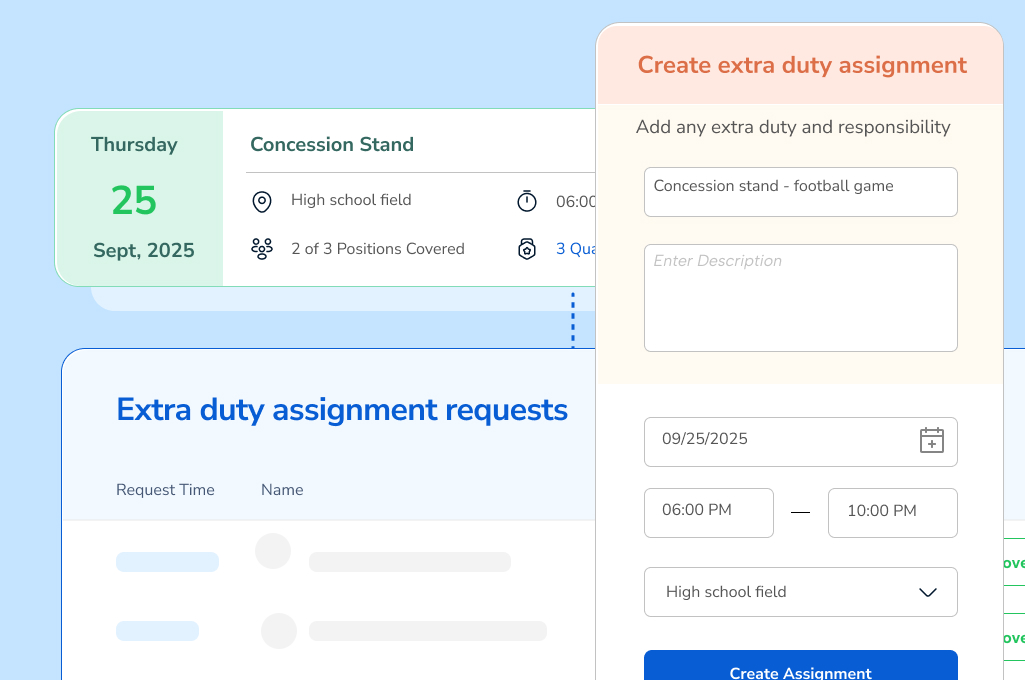
But, yes, it’s such a more intuitive way for districts to create, manage, and preapprove their extra duty work. It’ll help you streamline those by giving you the opportunity to schedule in advance, have that preapproval so that you’re ensuring that the right staff are assigned to the right tasks. And on top of that, it’s gonna be giving you that clear visibility — or the staff clear visibility — and control of who’s working what hours. So that gives you that little bit more of that budget control that you also need because time worked is time paid, and having that preapproval makes sure that time isn’t worked unless that person is approved to do that work.
So it’s a much easier, convenient, and lightweight way for you and your schools to be able to manage these extra duties. And I really love it, and I hope you do too. So, please, if you have any questions, always feel free to reach out to anybody if you’re already a customer. And if not, we’d love to talk to you.
Awesome. Thank you so much, Todd. Next, heading into the next slide, we’ll talk a little bit about Sub Manager. Now you may be looking at the slide thinking, what is Sub Manager?
So there’s been a lot of work that’s gone on into Sub Manager this year. With all of these new enhancements, it’s become so much more apparent than Sub Search, helping you search for subs. So you’ll notice very soon that we’ve updated the name from Sub Search to Sub Manager to more adequately speak to the other benefits it offers. So be on the lookout for a new name, and it is strictly aesthetics and no changes to the awesome solution.
So just to go over some quick and great enhancements that we’ve had: we’ve had contract-based assignments where you can easily create substitute assignments that align with contract hours; some split assignments for multi-substitute coverage, which is great when you have multiple substitutes. You can now split a single substitute assignment into multiple parts, making it easier to schedule. And then you can get improved visibility for group assignments, new type columns, and showing regular or grouped clear time ranges for group segments, plus confirmation before accepting or unaccepting assignments. So I have a question for Carlos who has been on Sub Search and who has been working very hard on these enhancements. So, Carlos, what are you most excited about with the new things coming to Sub Manager?
Of these things we see here, the big one, I think, is really subtle in how much it can change things, but could have a really big impact: the contract-based assignments. So today, as a teacher puts in a time off request, they need to define what type of coverage they need.
But what if that Friday happens to be an in-service day where there’s no class and there’s no real need for coverage?
What if there’s a holiday in there or something? Having the contract lets us know what actual work hours need to be covered. That way, we don’t schedule days that aren’t actually necessary. So that lowers the number of potential missed requests or errors in requests. So more accuracy, less people showing up for shifts that don’t actually exist.
Thank you so much, Carlos. So be on the lookout for new updates to Sub Manager, and we’ll be sure to let you know when all those new and fun and exciting things come out.
Alrighty. Next, let’s talk a little bit about Aladtec and TimeClock Plus. One of the highlights is togetheratlast — you can now connect TimeClock Plus and Aladtec. Perfect for municipalities and public safety agencies.
You can connect your time tracking and public safety scheduling systems for a complete solution that brings your time, leave, schedule, and payroll data together in one place. And it’s perfect for government agencies with ancillary public safety departments needing real-time data. So I’m gonna pass it over quickly to Michelle. So, hey, Michelle.
You’re an Aladtec PMM. How do you see the value for this integration for public safety?
Hey, Vanessa. Thanks so much. I’m glad to chime in a little bit here. So, yeah, this one is especially great for our public safety agencies who are using Aladtec’s rotational scheduling.
This offer brings the best of 24/7 public safety scheduling, time and attendance, and payroll together. And like Vanessa said, there’s gonna be some flexible time capture tools like biometric clocks and geofencing, and payroll processing becomes extremely easy by capturing those job codes, cost codes, leave time, and scheduled data for you. Really, that real-time data sync is where this offering shines. It means no duplicative data entry, and all your people leave and scheduled data gets replicated across your system. So that’s really the best part of it right there. So thanks for letting me chime in, Vanessa.
Of course.
Alrighty. Heading into the next slide. Continuing our education enhancements, we did our Ellucian Banner Cloud TimeClock Plus integration, and we’re the only ones to have this on the market. This integration connects TimeClock Plus with Banner using Ethos API connector.
It enables a smoother, enhanced workflow that makes it easier for shared customers to send data between the two systems. You can connect to all your favorite Ellucian products as a sole time tracking provider in the Ellucian partner network, and you can keep your time and attendance data nicely in sync, which results in less manual entry work and fewer errors, cleaner data in both systems, easier compliance for lower risk, and clearer time and payroll insights. Also, in case you missed it, we do have some new integrations with ADP, Workday, and an enhanced integration with PowerSchool.
TCP is always looking to innovate and keep more connected, making work easier.
Alrighty. And then keeping up with the ever-changing regulatory landscape and constantly evolving employment law is hard work, to say the least. So compliance center grants you easy access to support and legal consultations from HR law experts and attorneys. Gone are the days of using stand-alone compliance software, manually and painfully researching regulations, or hiring external consultants ad hoc. So, Todd, I’m gonna pick on you again if you wanna talk a little bit about compliance center.
Yeah. Absolutely. Yes. We all have that one friend who we kinda go to for some legal advice, especially if it’s some question that we’re not completely confident about.
And when it comes to time and attendance, it is critical that we have the right answers in that area, not just some friend we’re talking to. So let the compliance center be that friend for you. It comes with a dashboard where you can ask questions and a whole array of documents that are common to the industry. So if you need some sort of sign-offs or preapprovals that are required for a client reason, they can help you locate where those documents are, help you create one, or even review your HR handbook to make sure that it’s compliant with the local and federal laws that you and your employees may adhere to. So it’s located within TimeClock Plus. You’d have a link there that would take you to it, and you can ask those questions to your new compliance center friend that you can trust and get those answers that you need when you need them.
Awesome. Thank you. I know that feature is gonna be very helpful for this time of year, so thank you, Todd.
Alrighty. Heading into some coming soon. So last year, we soft-launched mobile manager. We’ve made enhancements over the year to make it easier to use.
One of the great things is that mobile manager is great for teams of 100. And one of the bigger things we’re excited about is leave request, which is now available, and managers will be able to view and approve leave requests from their phone. So whether you’re on the move or away from your desk, TimeClock Plus mobile manager makes it a breeze to manage tasks from anywhere and stay connected to your team. You can see who’s working right now, approve or fix time entries quickly, and make changes for multiple employees in just a few taps.
It’s available now on Android and the Apple Store. So simply open the app, and you can take care of business. No desk required.
So super excited for enhancements to mobile manager. Next, we’re gonna go into some exciting things coming to Sub Manager again. So finding substitutes in a pinch is going to be way less stressful in the very near future with upcoming enhancements coming soon to alerts and notifications. You’ll be able to automate sub outreach via phone call. So instant outreach to available subs, faster fill rates, less stress.
Again, Carlos, do you mind telling us a little bit more about what’s to come in Sub Manager, especially for automated calling?
Yep. So I think the school district has a mix of different technology levels, and some people love getting text messages. Some people love using the mobile app.
I think there’s a large set of people who just wanna get a phone call. So what we’re focusing on is being able to call people out, get the instant response from a phone call. But we’re focusing on the morning of. So that morning, you still have five assignments that need to be filled.
Well, instead of manually calling and trying to find someone to fill those assignments, we’ll do that calling for you. We’ll find the right candidate. And instead of sending a push notification or an SMS, we’ll give them an actual phone call. From that phone call, they can answer yes — accepted — or rejected, so that you can quickly find someone and get them assigned as soon as possible.
Awesome. Thank you so much. We’re super excited for that. We know that a lot of people have been looking for that in Sub Manager, so excited for all that is to come.
Alrighty. Heading into our multi-instance integration support. So one of the biggest benefits of TimeClock Plus is that it plays really nicely with both our Humanity Schedule and our Aladtec scheduling solutions. When your scheduling and time data live in a connected system, you have extra visibility and control when it comes to how every shift translates to hours worked. That means fewer payroll mistakes, no double entry, and no chasing down mismatched records — and more time focusing on the more impactful work that moves your business forward and is maybe a little more fun.
Currently, we support connecting one instance of Humanity Schedule or Aladtec to one instance of TimeClock Plus. But coming soon, you’ll be able to connect multiple instances of either our scheduling solutions to a single TimeClock Plus instance, further streamlining your workflows and centralizing your data for a combined solution that’s more than just fancy data sharing. This is great for organizations that may have different scheduling solutions per department. And, Carlos, if you don’t mind, how do you see this being very helpful to organizations having the multi-instance integration support?
Yeah. So I think you kinda mentioned it earlier. Right now, TimeClock Plus can connect to one Humanity Schedule or one Aladtec, but that kind of forces you to use just one scheduling tool as opposed to the best scheduling tool for your departments. So this lets you have each department or each little organization within your company have the right tool for them, whether they use Aladtec and the 24-hour rotational schedules or Humanity Schedule and need more dynamic scheduling. Whatever tool is the right tool for you, you can use that scheduling tool for that team.
Awesome. Thank you so much. So we’re excited for all the things that we’ve done in TimeClock Plus, and be sure to look out for even more. And I’m gonna pass it back to Michelle.
Hey. Awesome. Thanks, Vanessa. I’m here again to talk to you about Aladtec. So this is what we’ve been up to this year. We’ve been really focused on making Aladtec a lot easier to use, easier to love, with just a fresher, more intuitive experience.
And up first was the work we did for an enhanced mobile experience. The Aladtec mobile app helps admins and teams manage their day-to-day operations on the go no matter where they are in the field. So staff can view their schedules, trade shifts, and sign up for overtime, all with just a few taps on their phone. The app is free for iPhone and Android phones. And what’s really great is for our folks who do prefer to use PC, the app has the same easy-to-use and familiar interface. It’s really easy to pick up.
The other item here is the notification center, which is the one-stop shop for all things alerts. So alerts can include things like open shift offers, available overtime, or approval notifications for things like shift trades or time off requests. So these notifications can now be managed with a handy bell icon, and it perpetually sits on that task bar with a central hub so you can review all your current and past alerts so you’re not gonna miss a thing.
And the team has made alerts even easier to manage by adding in the appropriate redirects. So when you tap a push notification or alert on your phone, it brings you directly to that actionable item in the system, and it does the same thing when you’re on PC.
So for these two items in particular, again, it’s part of our overall efforts to just refresh and modernize that Aladtec UI and interface. So that new nav bar, with the notification center, all the work that went into the mobile app — you’re gonna see more of that type of work continue into 2026.
Next slide, please.
Up next are some detailed reporting and forecasting features we released this year. The open shift report is new, and that lets you view any open shifts for past, present, and future dates within a specified range that you select.
And you can easily find historical data on which shifts went unfulfilled, which really helps empower, especially our smaller agencies, the data that they need to support future budget requests. And because reports reflect all your schedule configuration changes, you always have the latest data.
So the accrual history report is next. This one is extremely straightforward. It captures all time off actions, helping admins and leaders analyze usage across the agency. So this report is gonna have all that info that you need without having to search through the system yourself, which honestly just gives teams some time back into their day.
And the other item on here is the accrual forecasting. So with this feature, employees can check their time off balances with flexible features and really easy-to-understand time information. They can view their future accrued time, and that includes sick, vacation, and comp time, which makes admins’ lives a lot easier by getting rid of any manual calculations or balance requests that they have to respond to.
And I’m gonna bring in our Aladtec product manager, Kyle Werner, real quick.
Hey, Kyle. Can you just tell us where that accrual forecasting feature lives? Like, how easy it is to get there and what to expect?
Hey, Michelle. Yeah. Absolutely. So the cool thing that we’ve done with the accrual forecasting is we’ve actually included it with our individual member report.
So for any new people coming to Aladtec and aren’t sure where that is, the individual member report is quite simply the first report that you’ll be able to see in your reports dropdown within Aladtec. So it’s gonna be able to give you information over any particular member that you have within your system. It provides one clean, concise way to view everything from shifts that they’re scheduled for, to trades that they’ve done, to any attributes or important details about their profile. So within that individual member report, we’re also going to have this time off accrual forecasting.
All you’re gonna have to do is select a single date, and it will show you your projected accruals for that date and all the time off buckets that Michelle just listed.
Awesome. Thanks so much, Kyle. Yeah. I love it. It’s just a click to your reports, and it kinda just lands you where you need to get.
I think it’s a really great job on that one. For these accrual report and accrual forecasting items in particular, both admins and staff are gonna get more insight into their time off, both for their personal time off and across the agency. It’s really gonna help boost that work-life balance for teams.
Alright. Let’s move on to some flexible scheduling controls we added to Aladtec this year. First is accrual updates. Now this used to be a pain point for our customers, so they asked for a different way to manage accruals, and we did the work.
With these accrual updates, admins can choose which accrual buckets they want to automatically track, including comp time, which is widely used in public safety. And it’s gonna give more accuracy and control over that accrual data. Plus it has that real-time data visibility.
We’ve also updated how scheduled block times are managed. So this makes it easy to make edits to preset schedules. This simplified workflow features a handy checkbox option when you’re building repeats and rotations that, when you click it, any preset blocks that are in that schedule get overwritten. The changes happen in real time, and there’s also a summary page that shows you any slots that got affected so you know exactly what got changed and when.
Next up, we’re gonna start chatting about 2026. I’m gonna toss it back to Kyle for a dive into shift bidding first up.
Awesome. Thanks so much. Hello again. So one thing that we understand over here at Aladtec is the power of choice and why choice is so important.
We recognize that, customer to customer, everyone’s got their own nuances, everyone’s got their own flavors of doing things. So we wanna be able to make sure you have the ability to do things the way that you need to do them and what’s most compliant to your organization structure. So what we’re bringing in for 2026 is another way to do shift bidding.
So the way that Aladtec currently does shift bidding is what we’d like to call the simultaneous approach. The simultaneous approach gives you the ability to input your shift preferences and your bid selections within a defined amount of time. Everyone inputs their bid selections. And once that submission period is over, Aladtec will generate those bid selections based on the seniority preferences that you have selected.
What we’re introducing in 2026 is the interval method. The interval method allows participants to select their bid preferences one at a time. So instead of everybody coming in at once and putting their time in within a given submission frame, we’re going to give you a sequential order and allow you to pick that order for which employees can come in and set their shift preferences. No matter which way you do it, your preferences are going to be approved and make sure that your admin is aware of them as they go. We just wanna make sure that you can run your shift bidding periods however you need to.
And then if we could just jump to the next slide here into 2026. Thank you very much. So we do have another couple interesting things coming down the pipe here as well. As you can see here, we’re really focused on that bidding experience for both scheduled time and time off. So we will also be including vacation bidding.
So we’ll make sure that it’s essentially a lot of the same processes that a lot of our customers today know and love about shift bidding.
It’ll be essentially kind of the same page. You’ll just be able to select whether you’re going through scheduled time or whether it’s for time off. So you’re gonna see a lot of similarities. One thing that we also want to call out is that we recognize that your bidding processes tend to be used for more long-term approaches.
You’re trying to build out your schedules for maybe six months or maybe out for the quarter. But we recognize that things happen. Sometimes you need to send out a few shifts and make sure those things are getting filled.
So we’re also going to be enhancing our staggered coverage alerts as well.
We are going to be giving our users the ability to send multiple shifts out at once. So think of it as a shift bidding process, but for a much smaller swath of time so you can fill those shifts quickly. So instead of sending those shifts out one at a time, send out multiples and your participants will be able to select which shifts they would like. And then of course, as time goes on, we’re gonna continue this UI refresh process. You’re gonna see new and revitalized things within the Aladtec system as time goes on in 2026.
And that’s all I’ve got for now. So I believe I will toss it over to Humanity Schedule, over to Anika. Thank you.
Yeah. Thanks, Kyle. Hey, everyone. My name is Anika, and I’m the Humanity Schedule product marketing manager.
On the Humanity Schedule side of the house, we had tons of cool things released this year, and so here’s a highlight of some of our personal favorites. In the beginning of this year, our team introduced a new task management feature into Humanity Schedule, and that’s shift tasks where you can assign tasks or duties to each shift and set expectations accordingly, including the ability for employees to log start and end times, where these details can also be generated in a report to analyze task completion rates and employee performance. Then we also launched minor roles this year.
Now if you work in retail, hospitality, or in an industry that employs lots of teenagers, whether it’s during the school year or during summer break, this one’s for you. This feature specifically makes it easier to comply with youth labor laws. With FLSA and state laws prebaked into our system, you’ll get alerted of potential conflicts when scheduling your minor employees. This also allows you to sync external school calendars into Humanity Schedule so you know exactly when your employees are available and when they’re not.
Most importantly, flagging a conflict should you accidentally schedule them during school hours, which we definitely don’t want to do. Now keeping on the theme of compliance, we also recently launched Fair Workweek Laws. Similar to minor labor laws, these regulations are dependent on region. This predictive scheduling feature alerts you when schedule or shift changes fall within the required advance notice period and that you may be subject to predictability pay risks.
To double down on our safeguard measures, the system will also send notifications to employees confirming their acknowledgment if and when changes fall within that advance notice window.
And last but not least, we gave our Knowledge Center a well-deserved facelift where customers can easily access quick help articles, release notes, and stay in the know of all things Humanity Schedule.
Now on the next slide, let’s go into some of this year’s popular system enhancements, starting with something that’s super timely: holiday rate cards. This is where you can automatically apply holiday pay rates, which are especially key for businesses that employ heavily during peak seasonal time frames and also in different locations with varying pay structures or regional requirements. The added bonus here, of course, is smoother payroll processing during a crazy hectic time of year where everyone’s just trying to shop.
Next is custom reports. This allows you to generate your own type of report using a mix of different data attributes, really enabling you to pull exactly what you want out of Humanity Schedule.
Next on the list here, we have bulk actions, specifically bulk shift edits and bulk staff edits. We all love a good shortcut that gets us to where we want to be with less time and fewer steps. Bulk shift edits allow you to make multiple shift updates at once, whereas bulk staff edits allow you to do things like enable or disable employee accounts or change minimum or maximum working hours. For example, this would be great for folks who have rotational or seasonal employees that cycle through. And last on this slide, there’s custom roles and granular permissions.
Now this one is the most recent enhancement, as well as one of the meatier enhancements to our system. And for this slide — or for the next slide — I’m bringing in the big guns at Humanity Schedule, and that’s our senior product manager, Chris.
Thanks, Anika. Hello, everyone. Yes. We are thrilled to announce that custom roles and granular permissions are currently available in Humanity Schedule. So while we have great foundational roles that cover different degrees of access for various people — manager, scheduler, schedule viewer — for some larger organizations, or as organizations continue to grow, there’s a need for increased flexibility when it comes to who can do which functions as it relates to the schedule.
So the management of shifts is where our first focus became. Leveraging our existing system roles like a scheduler, for instance, you can create brand new roles that can be as expansive or as limiting as you would like when it comes to shift management.
The overall goal is to provide admins with a path to finely tune permissions without providing too much, so we’re minimizing those unintended consequences that may happen. So very excited about this. Stay tuned for additional updates on this feature.
Now as we zoom out a bit on our 2025 plan, go to the next slide real quick.
Thank you.
As we zoom out on our outcomes and experiences that were delivered in 2025, we divided these deliveries across four major themes. First up, adaptability and usability. It’s always a focus for us. We always strive to improve the user experience and reduce the amount of time it takes to manage schedules and staff. There are other things that you need to do in your day-to-day, so we wanna make the process of managing your schedules and your shifts as easy and painless as possible.
As Anika highlighted with minor rules and Fair Workweek Laws, compliance continues to be a pillar for us as we know how important it is to reduce risks for your business and staffing overall.
Also, to make things easier as it relates to other systems communicating with Humanity Schedule, improvements were made to expand our already robust set of APIs that we have publicly available, as well as introducing a more automated flat file integration process and other areas in terms of updates to imports that you can view. So across different slices, we’re trying to make that process easier to manage.
And finally, AI assistant scheduling is a frontier that we continue to invest in.
Everything from expanding our current capabilities with demand scheduler, like introducing 15-minute intervals where you can have shifts automatically created, to ultimately introducing our brand new backfill process. So speaking of, Anika has some exciting updates for us on this particular topic. Anika, over to you.
Yeah. Thanks, Chris.
And so in the next slide, to end our presentation with a little teaser, we’ll soon be launching a brand new feature, like I said, called backfill. And this is the first of many 2026 AI features to come at TCP. Ultimately, backfill eliminates the chaos and the scramble of finding last-minute shift coverage by automating the entire replacement process. So with a single tap, backfill finds and notifies the most qualified and available employees via text/SMS based on criteria such as preferences, historical behaviors, availability, and pay rate.
With the help of AI, backfill will save tons of manager time, reduce unnecessary stress, and improve employee communications and overall team satisfaction. It’s a really fun one, so please keep an eye out for this big 2026 release. So with all that said, thanks everyone for joining and watching. And, Nancy, take us home.
Thanks, Anika, and thanks to all of our presenters. Really appreciate your time. And thank you to all of you for joining us today. We’ve made a lot of great progress this year, and we’re excited to do even more in 2026 to keep bringing you the best in time attendance and employee scheduling.
To our customers, thank you for your continued partnership that helps make our solutions a little bit better every day. And to our future customers, we can’t wait to meet you. If you’d like to learn more about our solutions or anything that we covered today, please don’t hesitate to reach out to our TCP team. Thanks again for joining us, and we look forward to 2026.
Key theme: strengthening education and public sector workforce management
Education and public sector organizations continue to face unique labor challenges, from compliance-heavy environments to highly variable schedules. In 2025, TCP focused on giving these teams more structure, clarity, and control where it matters most.
Smarter extra duty management for K–12 districts
For K–12 districts, managing extra duty work has long been a source of friction and budget risk. TCP addressed this head-on with targeted improvements to Extra Duty Manager.
Throughout 2025, TCP deepened its investment in education, particularly K–12. Updates to Extra Duty Manager now give districts a more structured way to manage after-hours and supplemental work. By requiring pre-approval, clarifying assignments, and improving budget visibility, districts can better align paid time with approved work and reduce unplanned labor costs.
Sub Manager evolves beyond substitute search
Beyond extra duty work, substitute coverage remains one of the most operationally stressful areas for districts. TCP expanded its approach to reflect the realities schools face day to day.
TCP evolved Sub Search into Sub Manager to reflect its broader role in managing substitute teacher coverage. New features like contract-based assignments and split assignments help districts schedule coverage that reflects actual instructional needs. These changes reduce scheduling errors and prevent substitutes from showing up for shifts that don’t require coverage.
Looking ahead, automated phone-based outreach will allow districts to fill last-minute absences quickly without relying on manual calls or fragmented notifications.
Key theme: connecting scheduling, time, and payroll across public safety
Public safety agencies operate under constant staffing pressure, where disconnected systems can quickly lead to errors, rework, and compliance risk. In 2025, TCP focused on bringing critical systems together.
TimeClock Plus and Aladtec integration
To support 24/7 operations and rotational schedules, TCP introduced a long-awaited integration for public safety teams.
For municipalities and public safety agencies, TCP introduced a direct integration between TimeClock Plus and Aladtec. This connection brings rotational scheduling together with time tracking and payroll data in real time. Agencies can now manage schedules, hours, leave, and job codes in one connected system, eliminating duplicate entry and improving accuracy in complex staffing environments.
Key theme: playing well across systems
As organizations grow more complex, clean data flow and reliable compliance support become non-negotiable. TCP treated both as foundational, not optional.
Deeper integrations for cleaner data
TCP continued to expand its ecosystem to reduce manual work and improve downstream accuracy across payroll and HR systems.
TCP reinforced its connectivity strategy with the launch of its Ellucian Banner Cloud integration via Ethos, making TCP the only time tracking provider in Ellucian’s partner network with this capability. Additional TCP integrations with Workday, ADP, and PowerSchool further reduce manual data entry, improve payroll accuracy, and simplify reporting across systems.
Built-in support for a changing compliance landscape
Technology alone isn’t enough when labor rules keep changing. TCP addressed this gap by embedding compliance support directly into the platform.
To help organizations keep pace with evolving labor laws, TCP introduced its Compliance Center. This in-product resource gives customers direct access to HR and labor law expertise, along with policy guidance and document support. Instead of managing compliance through external consultants or time-consuming research, organizations can address questions directly within TimeClock Plus.
Key theme: improving day-to-day usability for managers and staff
Across industries, TCP heard the same feedback: small usability improvements can make a big difference in daily operations. In 2025, those details mattered.
Mobile solutions and reporting that save time
TCP focused on removing friction from the most common manager and employee workflows.
Mobile Manager enhancements now allow managers to review and approve time and leave requests from anywhere. Aladtec updates delivered a refreshed mobile experience, centralized notifications, and new reporting tools for accrual tracking and forecasting, giving both administrators and employees clearer visibility with less manual effort.
Key theme: preparing for automation and AI-driven scheduling
Looking ahead, TCP shared how automation and AI will play a larger role in reducing last-minute chaos and manual coordination.
TCP previewed several 2026 initiatives for Humanity Schedule, including:
- Expanded shift and vacation bidding options
- Support for multi-instance scheduling integrations
- New features like Backfill
Backfill will automate last-minute shift coverage by identifying and notifying the most qualified available employees, helping managers fill shifts faster while reducing stress and communication gaps.
A year of practical progress
Taken together, these updates reflect a consistent theme across the platform: practical progress over flashy promises and hasty implementations. By reducing administrative burden, strengthening compliance confidence, and improving control over time and scheduling, TCP continues to help organizations manage labor more effectively.
We look forward to what’s ahead in 2026, and hope you’re part of it!
TCP Software’s employee scheduling and time and attendance solutions have the flexibility and scalability to suit your business and your employees, now and as you grow.
From TimeClock Plus, which automates even the most complex payroll calculations and leave management requests, to Humanity Schedule for dynamic employee scheduling that saves you time and money, we have everything you need to meet your organization’s needs, no matter how unique. Plus, with Aladtec, we offer 24/7 public safety scheduling solutions for your hometown heroes.
Ready to learn how TCP Software takes the pain out of employee scheduling and time tracking? Speak with an expert today.
Featured resources
Explore all resources