
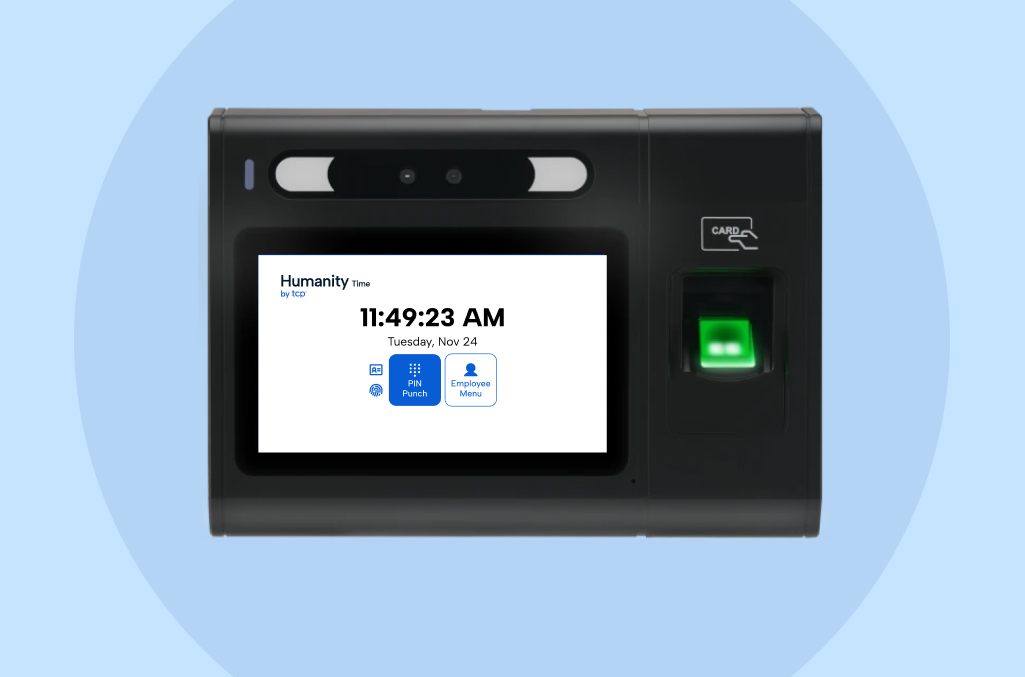
Capturing an employee’s punch shouldn’t be complicated, but at a lot of clocks, it still is.
It’s easy to tap the wrong clock in or clock out buttons, shaky internet connections cause lost punches, and when a mistake happens, the employee usually can’t fix it on the spot. It gets caught later, usually by a manager or during payroll, days after anyone remembers what happened during the shift and when time is of the essence (no pun intended).
The new Humanity Time clocks are designed to close that gap.
Most of our Humanity Time customers run one or two clocks, not a whole fleet. So a clock that captures punches accurately the first time matters.
Quick overview: what’s new with Humanity Time clocks
We’ll cover more of the details below, but here’s what you can expect from the latest version of our Humanity Time core clock.
What it is – A wall-mounted touchscreen clock running plug-and-play Humanity Time software. It comes in two models:
- HT520 Biometric clock – Great for organizations that want multiple ways to verify each punch. Employees punch with a fingerprint, proximity badge, or PIN.
- HT510 Badge reader – Great for high-traffic workplaces where employees need to clock in quickly or fingerprint scanning is less practical. Employees punch with a proximity badge or PIN for fast, reliable clock-in/-out.
Why it matters – Employees know exactly what to do at the clock and get through it quickly, and you gain greater confidence in your time data.
The challenge: you shouldn’t have to second guess punches
Punch problems look much the same from one workplace to the next.
What happens and how it impacts the business
At shift change, a handful of employees are all trying to badge in within the same few minutes.
Someone taps too fast and the scan doesn’t register cleanly, so they try again, and now there’s a duplicate time entry sitting on their timecard. Someone else accidentally hits the clock in button instead of the clock out button on the way out the door, or the Wi-Fi drops for a few minutes and every punch in that window is now a question mark.
By the time a manager sits down with the week’s timecards, all of these errors turn into a cleanup effort.
Why it persists
The employee who made the mistake usually can’t fix it in the moment.
They’ve already walked away and three stops into their shift they forget it was an issue, so the correction falls to whoever reviews the timecard later. Multiply these issues across a shift, a week, or different clocks/locations, and what would be a quick fix turns into a real chunk of a manager’s time each pay period.
You can’t completely remove these challenges. But you can reduce their frequency and try to remove the burden of fixing them when they do happen, which is our goal with every clock enhancement.
The newest Humanity Time clocks make time capture even more accurate and reliable.
Humanity Time updated capabilities
The new Humanity Time clock targets the friction points that show up at the clock every day. Here’s what’s new and why it matters.
| Capability | Why it matters |
| Clearer punch flow | Employees quickly authenticate, review the confirmation screen, make any edits, and start their day. The clock automatically records the right clock in or out entry based on the employees’ last punch. |
| Double punch prevention | A duplicate scan is blocked and explained on screen, while a deliberate job change still goes through. |
| Offline punch saving | If the connection drops, the punch saves on the clock and syncs in order once it’s back. Humanity Time clocks have logged 99.97% uptime, even on weak Wi-Fi. |
| Attestation and biometric consent, built into the punch | Ask custom questions at clock-out about breaks or shift details, and get biometric consent before any scan, with no separate paper process to manage. |
| Remote health signals and updates | Plain-language health signals flag any clock issues. Admins and your support contact can view the screen, push settings, or reboot the clock without a site visit. |
| Improved employee self-service at the clock | Hours, schedule, time off balances, and time off requests, all without a call to the manager. |
| Built-in door relay | Unlock a door after an approved punch, on the hours you set. Time capture and door access on one device, not two systems to manage. |
Every new capability above was built with the same consideration in mind: capturing punches should be consistent and reliable. Each update gives employees a clearer punch experience, adds greater compliance confidence and security, and lets managers oversee clocks remotely.
Customers running the new clocks are already seeing the difference:
Ready for more accurate time data?
No matter where you’re starting from, the new Humanity Time clocks are easy to bring on board.
If you’re new to Humanity Time
Every new Humanity Time customer can choose the new badge reader, biometric clock, or a mix of both to best fit their workplace environment. Take the Humanity Time product tour to see it in action.
If you’re already running Humanity Time Clocks
Move to the new clocks whenever you’re ready. Here’s what to know:
- Switching is plug and play – Each clock arrives preloaded with your current employees. Power it on with the included adapter, connect to Ethernet, Wi-Fi, or a cellular hotspot, and start punching. New hires and terminations sync automatically.
- Fingerprints are the one exception – For those swapping biometric clocks, fingerprint templates don’t carry over from your current clock. Employees re-enroll on the clock through a guided three-scan process that puts their consent on file for compliance, and the clock only scans a fingerprint once that consent is recorded. Badge and PIN punches keep working in the meantime.
- You can move one location at a time – Current and new clocks run side by side, so you set the pace.
- Nothing else about your service changes – Same team, same support, same Humanity Time you know (and love), with cleaner time data from every punch.
Ready to switch? Reach out to your account support contact.
Next steps
The new Humanity Time clocks are live for every new customer and current customers can start moving over on their own timeline.
Take the product tour to walk through the new clock screen by screen. If you’re already a Humanity Time customer, your account team can help you plan the switch. New to Humanity Time? Book a demo to see if it’s a fit for your team.
TCP Software’s employee scheduling, time, and attendance solutions are flexible and scalable to accommodate your organization and employees as you grow.
From TimeClock Plus, which automates even the most complex payroll calculations and leave management requests, to Humanity Schedule for dynamic employee scheduling that saves you time and money, we have everything you need to meet your organization’s needs, no matter how unique.
Plus, with Aladtec, we offer 24/7 public safety scheduling solutions for your hometown heroes.
Ready to learn how TCP Software takes the pain out of employee scheduling and time tracking? Speak with an expert today.
What to read next
Explore all resources


 Link copied!


