
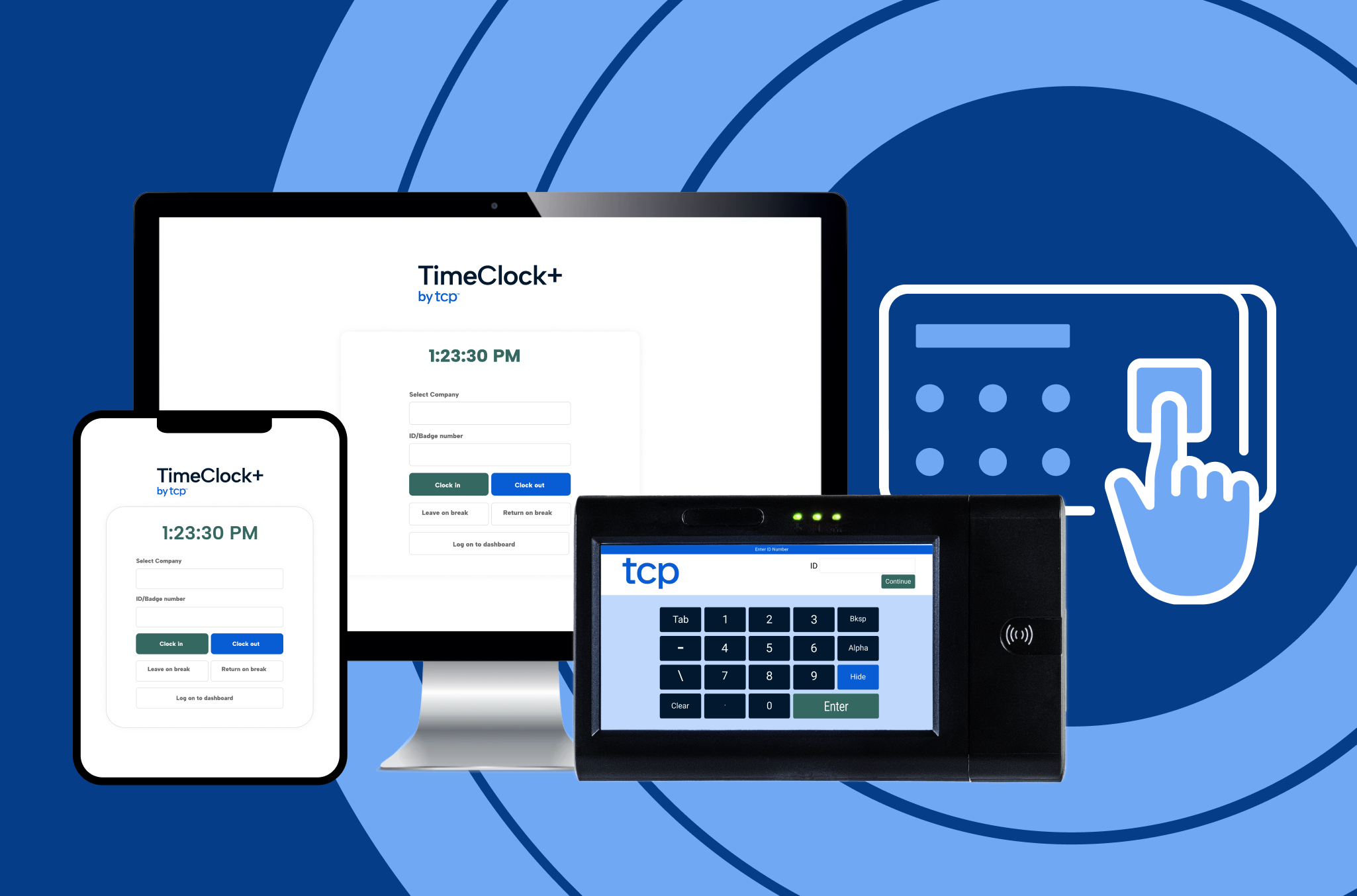
Time clock hardware is a different kind of purchase than software. It sits on a wall, gets used countless times a day, and needs to survive years of real wear before anyone thinks about replacing it. So evaluating it side by side with a software checklist doesn’t do the decision justice. This guide treats hardware on its own terms, as specifically as we can to match the conditions of your workforce.
Not to overstate the obvious, but TCP is a time clock hardware vendor.
Of course, we hope you’ll choose to work with us. But regardless of which vendor you go with, by the end of this guide, you’ll have a straightforward way to evaluate all of them, not just us. This guide has one primary goal above any sales pitch or brand play: help you make a decision about time clock hardware that you’re confident in, regardless of who you buy from.
Let’s get into it.
Download the PDF version of this guide to view offline
Why hardware still matters when everything’s going digital
Every workforce solution seems to be moving toward an app, a custom login, or a chatbot. So it’s fair to ask: why does a physical time clock still belong in the workforce conversation?
If you operate or manage a frontline workforce, you know that several problems still persist even with all the conveniences and enhancements of digital solutions. Hardware is the other piece of the time collection puzzle.
Buddy punching still happens with credentials
A password or verification code can be shared in seconds. A physical instrument (e.g., badge, fingerprint, proximity card, etc.) is much harder to manipulate. The idea is simple: someone has to physically show up to use it. That makes hardware your first line of defense against time theft and schedule manipulation. If this is a real cost in your organization, hardware covers what software alone can’t.
Not every workforce lives on a screen
Plenty of frontline teams work in places where a phone isn’t practical or allowed: a hospital floor, a manufacturing line, and even standard job sites requiring safety precautions like gloves or helmets. For these teams, mobile punches aren’t a workable substitute for a physical clock. There’s no phone to hand out, app to install, or login to fall back on.
Personal devices come with their own problems and preferences
Not every employee a) owns a smartphone or b) wants to use their personal device for work. Even if they’re willing, bring-your-own-device policies raise cost and privacy questions that don’t disappear just because you’ve got a free app or website.
Compliance needs a record that holds up
When a wage or hour dispute lands in front of an auditor or a judge, convenience no longer takes precedence over a clean and tamper-resistant record. A physical punch with a clear tie to a badge or fingerprint is harder to challenge than a self-reported login.
So the real question isn’t whether you need hardware. It’s which hardware fits your environment, your workforce, and your risk tolerance. That starts with a few things to think through before you look at a single device.
What to consider before you pick time clock hardware
Before you look at a single time clock, get clear on the constraints that will shape which one fits your workforce. Each factor below narrows which type of hardware fits.
(TCP professional buyer tip: mark each of these factors as “low concern,” “important,” or “critical” as you go through.)
The last thing you want is to skip over a critical factor early and have to revisit the decision later when it’s time to commit, or worse, after you’ve already committed. One question cuts through most of this faster than the rest: do you already run Workday or Oracle as your system of record?
If so, there’s a section specifically dedicated to you if so. Before we get there, let’s review the device types and industry specifications where you’ll spend the majority of your time in this guide.
| Environment | Workforce type | Connectivity | Authentication method |
| These factors rule out some devices before you even define your workforce type: washdown areas, outdoor entrances, cold storage, dust and noise exposure, etc. | A shared device works differently than a 1:1 device; glove-friendly needs and literacy or language barriers change which authentication method works best on the floor. | Power over Ethernet (PoE), Wi-Fi, or offline storage with sync all behave differently when the network goes down. Battery backup matters anywhere power interruptions are common. | Badge or card swipe, RFID/proximity, or biometrics each carry different tradeoffs in cost, speed, and hygiene. |
| Security need | State biometric law exposure | Payroll/HCM system compatibility | POS integrations |
| Be honest about how real the time theft (buddy punching) risk is for your workforce. Some devices can also trigger a connected system, like an electronic door lock, right after a clock operation. | Illinois (BIPA), Texas, and Washington have dedicated biometric privacy laws. Roughly 20 more states treat biometric data as sensitive under broader privacy laws, which still means opt-in consent before you deploy fingerprint or palm scan clocks. | The clock you choose should send back clean, payroll-ready data without extra manual work on the back end. Connectivity with a time tracking software is a major plus for simplifying the payroll exchange. | Relevant for retail, hospitality, and other shared-device environments where clock punches and point-of-sale activity need to line up. |
Quick reference: device type by vertical and segment
Everything covered in the coming sections — device type overview, industry fit, and segment — narrows down to a small set of recommended starting points. This table should function as your first stop before reading the breakdowns for your organization type.
| Industry/segment | Recommended device type | Why it fits |
| K-12 education | RDT with badge or PIN | Durable across buildings, simple enough for substitute and part-time staff |
| Government (local) | RDT with badge or biometric | Tamper-resistant record for grievance defense, fits multi-department rollouts |
| Public safety | RDT with biometric or badge | Holds up through shift changes, supports chain-of-custody on records |
| Healthcare | RDT with biometric or badge | Fits credential-sensitive, hygiene-conscious, personal device-restricted settings |
| Retail | RDT with badge or biometric | Closes the time theft gap a shared, phone-based clock-in leaves open |
| Manufacturing | RDT with RFID or biometric | Works with gloves and PPE, supports job costing by task or line |
| Small business | Mobile, PIN, or browser-based clock | No IT lift, no fleet of devices to manage |
| Enterprise | RDT with certified HCM integration | Extends the existing HCM system of record, covered next |
Time clock device types overview
Most physical time clocks work the same basic way:
- An employee identifies themselves at a fixed location
- The device records the punch with time and shift information
- That record flows into time tracking software and/or payroll
Where solutions differ is how they approach authentication, the friction of handling employee IDs and device records, and the capability limitations of the device.
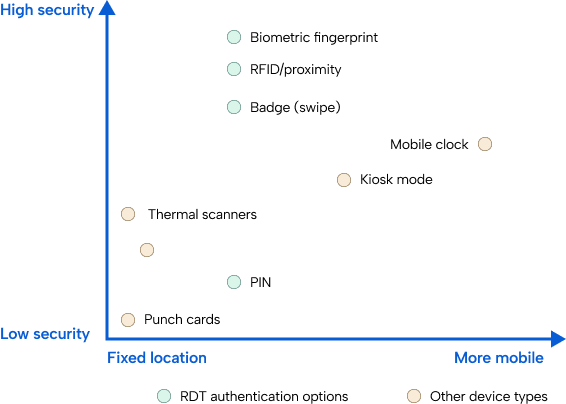
The Remote Data Terminal (RDT)
Simpler devices tend to lock you into one authentication method for the life of the hardware. More mature solutions take a different approach with the RDT: one physical clock, modular authentication.
Instead of choosing a device per authentication method, your organization chooses the clock once and picks the method that fits your workforce, then adds or swaps methods later without replacing the hardware.
Here are a few RDT authentication methods, along with the pros and cons of each one:
PIN
- Pro: Fast to deploy, no cards or badges to issue or replace, lowest-cost option
- Con: Easy to share between employees, offers the least protection against buddy punching
Badge with magnetic swipe
- Pro: Familiar format for most employees, faster than a PIN, works well in moderate-traffic environments
- Con: Badges get lost, forgotten, or lent out, and swipe strips wear down over time
Biometric fingerprint
- Pro: Tied to the individual, the strongest deterrent against buddy punching
- Con: Higher upfront cost, may raise state-specific legal requirements (see biometric law section), and hygiene concerns in some settings
RFID/Proximity
- Pro: Faster than swiping, works well with gloves, badge doesn’t need to make contact with the reader
- Con: Still a shareable credential — solves speed, not buddy punching
TL;DR – PIN and badge cover cost and speed. Biometric covers security. Most organizations land on badge as the default, with biometric reserved for teams where time theft is a documented, real cost.
Now let’s look at the secondary device options that aren’t tied to a fixed location.
Mobile with geofencing
Verifies an employee’s location at the moment they clock in, built for workers who move between sites rather than reporting to one fixed location.
- Pros – No physical hardware to install or maintain, works well for field teams, home health, and multi-site supervisors.
- Cons – Requires employees to have a smartphone and be willing to use it for work, doesn’t solve the personal device or restricted device problems covered earlier, and offers no protection against buddy punching if the device itself is shared.
Kiosk mode
A tablet set up as a shared punch station, useful in a pinch rather than a first recommendation.
- Pros – Lower cost than a dedicated RDT, works well as a temporary/backup/on-the-go option, easy to relocate.
- Cons – Tablets aren’t built for the wear a dedicated time clock handles daily, and kiosk mode doesn’t offer the same range of authentication options as an RDT.
Web clocks
A browser-based clock-in for desk-based employees who don’t need a physical device.
- Pros – No hardware cost, easy to roll out to office staff, works on any device with a browser.
- Cons – Only fits desk-based roles. Anyone without regular computer access can’t use it, and it carries the same shared login risk as any other software-only method.
Thermal scanners
Contactless temperature and identity scanning saw a spike in demand during the pandemic. Thermal scanners now fit a narrow, declining set of use cases rather than a mainstream recommendation.
Punch cards
The original time clock format, still in use in a shrinking number of organizations. Punch cards offer no digital record, no integration with payroll management software, and no protection against buddy punching. Every device type above replaces what a punch card used to do, with a cleaner record and less manual work behind it.
Device type answers the question of what’s available. The next question is which one fits a specific workforce, which changes based on your industry.
Industry-specific time clock hardware considerations
The right device depends less on your industry label and more on what happens in a given environment: how many buildings someone moves through, whether they’re wearing gloves, whether a badge doubles as building access, whether a personal phone is even allowed on the floor.
The industries below aren’t perfectly clean-cut categories so much as recurring patterns within these constraints. Here’s how each one typically plays out, and what a clear starting point looks like for each.
K-12 education time clocks
Day-to-day reality – Cafeteria staff badge in before the first bell. Custodial and maintenance crews move across multiple buildings on the same campus, sometimes across a whole district. Substitute teachers show up somewhere new every few weeks and need a device that requires zero training. Some buildings and entrances run with little to no direct supervision, which means the clock itself is doing part of the oversight job.
Clear starting point – An RDT with badge or PIN access. Badge covers staff and faculty who are on campus every day, while PIN covers substitute and part-time staff who need to walk up and clock in without an orientation session.
Government (local and state) time clocks
Day-to-day reality – A public works crew badges in at a maintenance yard before heading out to job sites. Permit counter staff clock in at a public-facing window. A union grievance over overtime pay gets settled, in part, by whether the timestamp on record can be trusted. Rollouts often span multiple departments and buildings, layered on top of payroll systems that have been in place for years.
Clear starting point – An RDT with badge or biometric access. In union agencies, biometric earns its cost back the first time a disputed punch needs to hold up.
Public safety time clocks
Day-to-day reality – A 24-hour rotating shift change at a fire station means overlapping personnel clocking in and out within the same window, sometimes for a shift that doesn’t match anyone’s calendar day. Overtime and extra duty pay get scrutinized closely, both internally and by the public. A disputed shift record needs more evidence than a timestamp i.e., a chain-of-custody trail.
Clear starting point – An RDT with biometric or badge access, chosen for the same reason as local government (because the record needs to hold up under scrutiny).
Healthcare time clocks
Day-to-day reality – A nurse badges in at the start of a shift, often using the same badge for medication cart access or building entry. Personal phones are commonly restricted or banned in clinical areas, which takes a mobile clock off the table before it’s even considered. Hygiene concerns around shared touch surfaces can also shape which authentication method will be adopted.
Clear starting point – An RDT with biometric or badge access, based on whatever personal device policy and hygiene standard is already in place for that unit or facility.
Retail time clocks
Day-to-day reality – A cashier clocks in behind the register at the start of a shift. Stockroom staff use a separate device away from the sales floor. Seasonal hiring means a wave of new employees who need to be up and running on day one, with no room for a training curve on the clock itself.
Clear starting point – An RDT with badge or biometric access at the point of sale or in the back room. The shared device environment is exactly where a mobile clock tied to one person’s phone falls short.
Manufacturing time clocks
Day-to-day reality – A line worker wearing gloves badges in at an RFID reader near the shop floor entrance without breaking stride. Biometric stations near a locker room or main entrance handle identity verification where gloves aren’t in the way. Job costing depends on tying each punch to a specific task or line, not just a shift.
Clear starting point – An RDT with RFID or biometric access at entry points, matched to whichever authentication method holds up best against gloves, PPE, and floor noise.
Industry explains the typical environment, but that environment varies widely by scale. A 40-person clinic and a 4,000-person hospital network are both healthcare organizations, but they buy hardware differently even inside the same vertical.
The next section covers how scale changes your buying decision.
Scale-specific considerations: small business, mid-market, and enterprise
Every organization we work with sits somewhere on a spectrum of cost tolerance, IT bandwidth, and rollout complexity. Splitting that spectrum into three size profiles is a bit of a simplification, but a useful one.
Our designations of scale here aren’t prescriptions for your ideal time clock hardware, but reflect what we’ve seen across more than 32,000 TCP customers. This guidance intends to help you:
- Choose your time clock device starting point
- Build the case for a specific application or functionality
- Consider all the variables that may influence your setup
| Small business | Mid-market | Enterprise |
| Cost and simplicity dominate. A single location, or a small handful of them, doesn’t need a device fleet to manage or a rollout plan to coordinate. PIN, mobile, or web-based clocks with no IT lift to set up get a small team running fast, without adding a device management task to someone’s already full plate. | This is where vertical fit starts to matter as much as segment. A 300-person K-12 district and a 300-person retail chain both sit in the mid-market segment, but they’re solving different problems: one needs badge access across multiple school buildings, the other needs shared devices at the point of sale across multiple stores. Mid-market organizations usually have enough scale to justify an RDT rollout, but not enough internal IT bandwidth to manage a complicated one, so install simplicity matters here more than it does at either end of the spectrum. | Complexity, multi-site rollout, and existing systems lead the strategy instead. Getting hundreds or thousands of devices live across multiple locations is as much about the change management as the cost. Enterprise organizations are also the most likely to already run Workday or Oracle as their HCM system of record, which changes the hardware conversation entirely: the question isn’t just which device to buy, but how that device fits into a system that already exists. |
We’ve covered a lot so far about which type of time clock hardware fits your organization.
Now that you’ve reviewed the scale-specific considerations, the following section applies specifically to Workday and Oracle customers. If that’s not you, feel free to skip ahead to the Evaluating vendors section.
Workday and Oracle users: specific time clock hardware guidance
Up to this point, this guide has stayed vendor-neutral on purpose. Recall you’re reading this content from a time clock hardware provider. Whether you decide to work with us or not, we want you to choose the best option for your organization, even if it’s not us.
However, this is a section where we can only speak specifically to TCP’s time clock capabilities, not the best practices and functionality you should look for in any time clock.
Workday and Oracle integrations
Environment, vertical fit, authentication method, and vendor evaluation criteria apply no matter who you buy hardware from. But if your organization already runs Workday or Oracle as its HCM system of record, there’s one more layer worth understanding, and it’s specific to how TCP approaches hardware for organizations in that exact position.
TCP Direct pairs TCP time clocks with TimeClock Plus running underneath, then connects into your existing HCM through a Workday– or Oracle-certified integration. Punch data arrives clean and payroll-ready inside the system you already run, with labor rules applied, exceptions flagged, and compliance checks done before the data reaches your HCM.
Your existing HCM stays the system of record, and TCP Direct works as an extension of it.
Why TCP makes sense when using Workday or Oracle
The need for a TCP time clock shows up most often in two situations:
- Replacing legacy Kronos hardware during an HCM migration
- Hitting a capability gap your current HCM’s clocks or time tracking solution can’t cover
If these scenarios don’t reflect your organization, head to the vendor evaluation section. But if it does describe your setup, it’s worth a conversation before you finalize a vendor and device decision.
Evaluating time clock hardware vendors
Choosing the right device type is the first part of your time clock hardware decision. The second part is choosing the right vendor to buy it from. Take it from us as both a hardware and software vendor: evaluation looks different for hardware than it does for software.
- A software buyer’s checklist runs through configuration, licensing, and integration behavior.
- A hardware buyer’s checklist has to account for something a software vendor doesn’t have to answer for — what happens when a physical device sits on a wall for the next five to seven years, taking wear from the environment around it every day?
The evaluation ahead intends to give you the most specific applications for time clocks and what you might run into for your organization’s specific use cases. A quick example of how this plays out: two vendors quote similar unit prices for the same device count.
One vendor’s clocks sync in real time and integrate both directions with your payroll system. The other exports data once a day, one way only. The second option looks identical on a spec sheet, then costs more in payroll corrections within the first quarter.
Here’s our set of seven considerations we recommend every organization go through before deciding on a vendor, whether it’s TCP or a different solution:
☑ Durability and warranty – Built to handle the environment it’s going into, backed by a warranty that matches. A device rated for an office won’t survive a loading dock, no matter what the warranty says.
☑ Install complexity and scalability – What it takes to get devices live, and whether that process holds up when you’re managing hundreds of them across multiple sites, not just a handful in one building.
☑ Support and maintenance model – Who you call when something breaks and how fast they respond. A device down for a week during a busy payroll period is a different problem than a device down for an afternoon.
☑ Ecosystem compatibility – How well the hardware integrates and stays compatible with the systems you already run, versus how much it locks you into buying everything from one vendor going forward. Integration depth lives here too: bi-directional sync versus one-way export, real-time versus batch processing, and single sign-on (SSO) support.
☑ Total cost of ownership – Unit price is one line item. Install costs, IT time, ongoing support and maintenance, and eventual replacement are the rest of it.
☑ Security and compliance – How the vendor secures the data these devices collect, and whether they meet the compliance standards your organization is already held to. Additionally, how well the vendor adapts to regulatory changes impacting their clocks.
☑ Roadmap and update cadence – Hardware is a long-term commitment. Ask what new device models or authentication methods are on the vendor’s roadmap, how often firmware and security updates ship, and whether older devices stay supported when newer ones launch.
Common mistakes before choosing time clock hardware
With everything covered so far, it’s hard to imagine still picking the wrong device. But hardware rollouts still go sideways, usually because someone skipped a step earlier in the process, and the consequences don’t show up until months later.
Before finalizing your choice, run through these common mistakes (and learn how to fix them before they happen to you):
| Mistake | What it looks like | The fix |
| Treating authentication as one org-wide decision | A district issues the same badge-only setup to every building. Substitute staff, for example, struggle at unfamiliar entrances while cafeteria staff swap badges without a second thought. | Modular authentication solves this. It’s a different setting on the device you already have, not a different device. |
| Buying biometric before checking state law | Fingerprint or palm-scan clocks get installed, then legal flags a compliance gap the organization didn’t know existed. | Check state biometric law exposure before you commit to a biometric rollout, not after. |
| Not confirming outage behavior | Wi-Fi-only hardware at a site with a known spotty connection keeps working fine, until the one day it doesn’t and a shift’s worth of punches goes missing. | The real test of data is in its integrity: does the device keep a clean record when the connection drops? |
| Sizing to today’s headcount | A team buys hardware for its current size, and a second purchase decision arrives faster than anyone planned for. | Size for where the organization is headed in two to three years, not just where it stands today. |
| Trusting “connects to everything” | A vendor’s integration claim sounds reassuring on a sales call, but nobody confirms the direction, data it collects/maps/syncs, or frequency of that sync. | Ask specifically: which direction does data flow, and how often does it sync? |
| Ignoring the support and maintenance model until something breaks | The first time anyone finds out how a vendor handles a broken device is the day one actually breaks. | Simple but easy to forget: ask about the support process, response time, and ongoing maintenance before you sign. |
None of these mistakes are unusual. The good news is they’re avoidable with the same discipline this guide has walked through: know your environment, know your industry and scale, and evaluate the vendor on more than price.
Next steps: choosing the right time clock hardware for your team
This guide started with a simple question: does hardware still matter when everything else is going digital?
The answer holds up across every section since. Time theft, restricted device environments, personal device limitations, and audit-ready compliance records are all problems that software alone doesn’t solve. From there, the path narrows the same way for every organization:
- Understand your environment and constraints
- Match a device type to your vertical and day-to-day reality
- Account and adjust for your scale
- Evaluate any vendor against durability, install complexity, support and maintenance, ecosystem fit, total cost, and security
Skip a step, and it tends to resurface later as a second purchase decision, a labor compliance gap, or repeat support calls and workarounds you didn’t plan for.
Why TCP time clocks fit your organization best
TCP built its hardware lineup around this exact four-step logic.
The RDT gives you one physical clock with modular authentication, so a badge-only rollout today can add biometric access for one team next year without a second device purchase. Mobile with geofencing, browser-based clocks, and kiosk mode round out the lineup for the teams that don’t fit the RDT model.
And for organizations running Workday or Oracle, TCP Direct turns that same hardware into a super valuable extension of your existing HCM system of record, so punch data arrives clean and payroll-ready.
That’s what a mature time clock hardware solution looks like in 2026: one clock that adapts as your organization does, backed by TimeClock Plus, and a certified path into the HCM you already run.
If this sounds like your winning formula, see TCP’s full lineup of time clock hardware options by speaking with an expert, and if your organization already runs Workday or Oracle, explore how TCP Direct brings more value into your existing investment.
TCP Software’s employee scheduling and time and attendance solutions have the flexibility and scalability to suit your business and your employees, now and as you grow.
From TimeClock Plus, which automates even the most complex payroll calculations and leave management requests, to Humanity Schedule for dynamic employee scheduling that saves you time and money, we have everything you need to meet your organization’s needs, no matter how unique. Plus, with Aladtec, we offer 24/7 public safety scheduling solutions for your hometown heroes.
Ready to learn how TCP Software takes the pain out of employee scheduling and time tracking? Speak with an expert today.
What to read next
Explore all resources

West Texas Lighthouse for the Blind Cut Costs



 Link copied!


