

It’s the end of a long week, and the overnight crew is running on fumes.
A paramedic calls out sick, a shift swap slips through the cracks, and now dispatch is scrambling to fill a gap just as call volume starts to climb. Within minutes, one missed update turns into a full shift shuffle, and everyone feels the strain.
If you run or operate in Emergency Medical Services (EMS) teams, moments like this aren’t rare. Between unpredictable emergencies, rotating crews, and the constant pressure to stay fully staffed, keeping schedules straight can feel like its own emergency. Fatigue rules, certifications, and coverage requirements only add to the puzzle.
Managing all that from spreadsheets or whiteboards might have worked once, but operations move too fast today. One error can ripple across stations, delay response times, and leave crews burned out.
This guide compares the top seven EMS scheduling software solutions for 2026: what each one does well, where it falls short, and how to match a platform to your agency’s size and structure.
The shortlist of EMS scheduling software
EMS operations, while in the realm of public safety, differ from law enforcement or fire. Paramedics, EMTs, dispatchers, and support staff work together to deliver lifesaving care 24/7, often with meticulous attention to detail. It’s a system built on coordination, communication, and readiness.
You’re managing:
- Unpredictable emergencies
- Revolving crews
- The pressure to stay full staffed
- Dynamic shift patterns like rotating shifts
- Multiple station assignments
- Specialized certifications that can change daily
- Crew fatigue and burnout risk across 24/7 rotations
You also need to maintain compliance with rest rules, licensing, and labor contracts the entire time.
That’s where dedicated EMS scheduling software comes in.
Here’s our shortlist of 2026’s best EMS scheduling solutions built for emergency response:
- Aladtec (by TCP)
- Vector Solutions (CrewSense)
- inTime
- ESO Scheduling
- eSchedule
- PowerTime (PowerDMS by NEOGOV)
- Pace Scheduler
Each solution below is evaluated by ease of use, features, standout capabilities, and what makes it unique for real-world EMS teams.
1. Aladtec (by TCP Software)
Reliable, configurable scheduling for EMS, fire, and public safety.
| Category | Details |
| Ease of Use | Intuitive, mobile-friendly interface for supervisors and field staff |
| Features | Shift scheduling, overtime tracking, certification management, fatigue safeguards, and communication tools |
| Standout Features | Rule-based scheduling by role or certification, fatigue alerts, and detailed reporting |
| Reasons to Buy | • Built specifically for public safety • Supports multi-level EMT and paramedic scheduling • Instant communication between teams |
| Reasons to Avoid | • Requires some setup to match agency policies • Best suited for agencies ready to standardize on one system |
Why Aladtec stands out
Aladtec is trusted by thousands of EMS and fire departments because it’s custom fitted for how public safety teams work. Supervisors can assign shifts, enforce rest rules, and communicate changes instantly. Crews can swap shifts or request time off from any device.
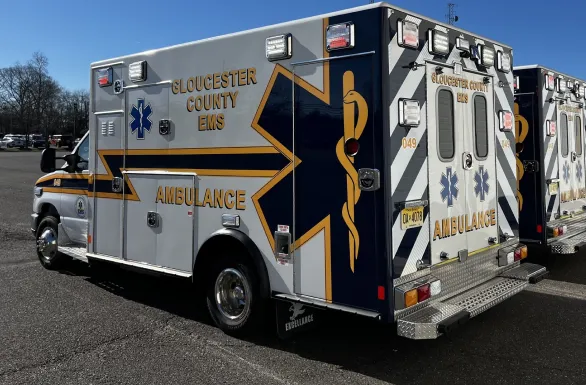
Gloucester County EMS, a 260-plus-employee department covering 23 municipalities in New Jersey, has run on Aladtec for 17 years. During COVID-19, the department scaled from 10 to 27 crews and coordinated a vaccination site that served nearly 500,000 people without missing a shift.
For EMS leaders managing multiple stations or mixed certifications, Aladtec delivers flexibility, compliance, and clarity in one platform.
2. Vector Solutions (CrewSense)
Dynamic scheduling and resource management for emergency response.
| Category | Details |
| Ease of Use | Straightforward for dispatchers/shift leads; good mobile access |
| Features | Roster management, callout/callback automation, overtime tracking, and fatigue alerts |
| Standout Features | Automated callout and fill-in tools with text/email alerts |
| Reasons to Buy | • Built for EMS and fire operations • Excellent for 24/7 resource coordination • Integrates with Vector’s compliance and training suite |
| Reasons to Avoid | • Higher learning curve for small agencies • Better suited for mid- to large-sized teams • Smaller teams can end up paying for functionality they won’t use |
Why Vector Solutions stands out
Vector Solutions is purpose-built for shift-based, always-on larger agencies. It automates callouts and shift replacements, removing the manual back-and-forth of texts and calls. Availability, fatigue rules, and staffing coverage are all tracked in real time.
However, CrewSense’s robust functionality can feel excessive for smaller or volunteer-based EMS teams that don’t require large-scale automation.
3. inTime
Comprehensive scheduling for large or multi-division EMS agencies.
| Category | Details |
| Ease of Use | Detailed configuration needed, works best with a dedicated admin |
| Features | Rule-based scheduling, certification tracking, analytics, fatigue management and monitoring |
| Standout Features | Deep compliance automation and labor law compliance |
| Reasons to Avoid | • Long setup process • Can feel overly complex for smaller departments |
| Reasons to Buy | • Ideal for regional or metropolitan EMS systems with a dedicated admin/owner • Integrates overtime, fatigue, and training data • Detailed analytics for compliance and reporting |
Why inTime stands out
For multi-division systems that need airtight documentation and wellness and fatigue controls, InTime automatically enforces your agency’s eligibility, rest, and overtime rules.
InTime enforces your agency’s eligibility, rest, and overtime rules automatically — ideal for multi-division systems that need airtight documentation and wellness/fatigue controls.
While powerful, the complexity and cost may be overkill for straightforward operations or teams who don’t want to get locked into excessive layers of management.
4. ESO Scheduling
All-in-one workforce management for EMS and healthcare, formerly sold as ePro Scheduler Plus.
| Category | Details |
| Ease of Use | Moderate learning curve; intuitive after initial setup |
| Features | Scheduling, time and attendance, certification tracking, payroll integration |
| Standout Features | End-to-end workforce management with unified scheduling and payroll management |
| Reasons to Buy | • Designed specifically for EMS and transport operations • Connects scheduling, timekeeping, and payroll • Ensures credential compliance and reporting |
| Reasons to Avoid | • Older interface compared to newer cloud tools • Requires upfront configuration work |
Why ESO Scheduling stands out
ESO Scheduling, the product long known as ePro Scheduler Plus, is a proven, integrated suite for EMS operations. It connects scheduling with timekeeping and payroll and reduces manual reconciliation while improving cost visibility.
However, the UI feels dated next to newer solutions, and setup takes admin effort.
5. eSchedule
Streamlined scheduling for small to mid-sized EMS agencies.
| Category | Details |
| Ease of Use | Simple, user-friendly design ideal for smaller agencies |
| Features | Shift swaps, time-off requests, certification tracking, and mobile access |
| Standout Features | Clean design, strong customer support, and quick implementation |
| Reasons to Buy | • Fast onboarding with minimal training • Reliable and affordable for smaller teams • Includes certification and license tracking |
| Reasons to Avoid | • Lacks advanced rule automation • Not built for complex, multi-station operations |
Why eSchedule stands out
eSchedule gives EMS agencies a lightweight, affordable way to move off spreadsheets. Its focus on core scheduling makes it a balanced option for smaller or volunteer operations.
However, larger, multi-station systems may outgrow its controls and reporting depth, while the rule automation and fatigue control are limited.
6.PowerTime (PowerDMS by NEOGOV)
Scheduling that ties directly to policy and credential management.
| Category | Details |
| Ease of Use | Straightforward for PowerDMS users; moderate learning curve otherwise |
| Features | Shift publishing and trades, 24/7 rotations, credential verification, time tracking, and extensive audit reporting |
| Standout Features | Works best within PowerDMS training and policy tools |
| Reasons to Buy | • Ideal for accreditation-focused EMS agencies • Links scheduling to certification and policy records • Simplifies compliance documentation |
| Reasons to Avoid | • Limited flexibility when used alone • Not as feature-rich as standalone scheduling platforms • Roadmap tailored for existing PowerDMS customers |
Why PowerTime stands out
PowerTime, the scheduling product formerly known as PlanIt Schedule, connects EMS scheduling directly with policy and training data as part of PowerDMS by NEOGOV’s public safety platform.
It helps administrators assign only qualified, credentialed staff to shifts, an advantage for agencies prioritizing compliance and safety.
When paired with PowerDMS, it delivers a unified system for scheduling, training, and documentation. However, when used independently, it lacks the customization and broader feature set of dedicated scheduling solutions. The emphasis on templates and minimum staffing compromises agencies needing automation like fatigue modeling.
7. Pace Scheduler
Affordable, reliable scheduling for smaller or regional EMS providers.
| Category | Details |
| Ease of Use | Quick setup and easy navigation for non-technical users |
| Features | Shift scheduling, overtime alerts, payroll exports, and notifications |
| Standout Features | Simple dashboard, flexible scheduling templates, responsive support |
| Reasons to Buy | • Budget-friendly and straightforward • Reliable daily coverage tracking • Great customer service for smaller teams |
| Reasons to Avoid | • Limited rule enforcement and compliance tools • Not ideal for growing mid-market and enterprise-level operations |
Why Pace Scheduler stands out
Pace Scheduler keeps EMS operations running smoothly with minimal setup and strong reliability. It’s perfect for smaller departments that need coverage visibility without investing in heavy-duty software.
Its balance of simplicity and affordability makes it a favorite among community-based EMS providers. Larger or multi-district agencies may find its limited automation insufficient for managing complex staffing rules. Basic controls don’t lend themselves to scalability or complexity in the platform.
How to pick the right scheduling software for your EMS agency
Every EMS organization faces unique scheduling challenges, from fluctuating call volume and fatigue management, to certification tracking and last-minute callouts. The right solution helps you mitigate those pain points before they impact response times.
When comparing platforms, focus on how each handles:
- Rule-based scheduling – Automatically assign staff based on certification or role.
- Fatigue management – Enforce rest periods and prevent burnout, and look for built-in wellness resources or mental health support rather than a bolt-on afterthought.
- Credential tracking – Verify every crew member is certified for their role.
- Real-time notifications – Keep field teams informed of changes instantly.
- Multi-station coordination – Manage coverage across service districts with ease.
- Audit-ready reporting – Maintain transparent, defensible records for regulators, and confirm reporting is granular enough to support grant reimbursement submissions.
Also ask how long implementation takes and whether the vendor helps migrate existing schedules and certifications. A lengthy rollout can erase the time savings a feature advantage promised on paper.
Ask vendors how their systems perform during simultaneous callouts, mass emergencies, or overlapping shifts, not just under ideal conditions.
Smarter scheduling builds stronger response
Dependable scheduling is the catalyst for EMS readiness. When your team knows their shifts and leadership can monitor coverage in real time, operations become smoother, safer, and more sustainable.
Operations become smoother, safer, and more sustainable when your team knows their shifts and leadership can monitor coverage in real time.
By replacing manual spreadsheets and call chains with software built for 24/7 public safety scheduling, your agency can reduce fatigue, improve fairness, and build visibility into every shift and every decision.
TCP Software built Aladtec for rule-based scheduling, fatigue safeguards, and real-time communication, whether you manage one or a dozen stations.
With Aladtec, every minute counts, because when you’re responding to an emergency or saving a life, it does.
TCP Software’s employee scheduling and time and attendance solutions have the flexibility and scalability to suit your business and your employees, now and as you grow.
From TimeClock Plus, which automates even the most complex payroll calculations and leave management requests, to Humanity Schedule for dynamic employee scheduling that saves you time and money, we have everything you need to meet your organization’s needs, no matter how unique. Plus, with Aladtec, we offer 24/7 public safety scheduling solutions for your hometown heroes.
Ready to learn how TCP Software takes the pain out of employee scheduling and time tracking? Speak with an expert today.
What to read next
Explore all resources

How Bolton EMS Runs a Tighter Operation



 Link copied!


