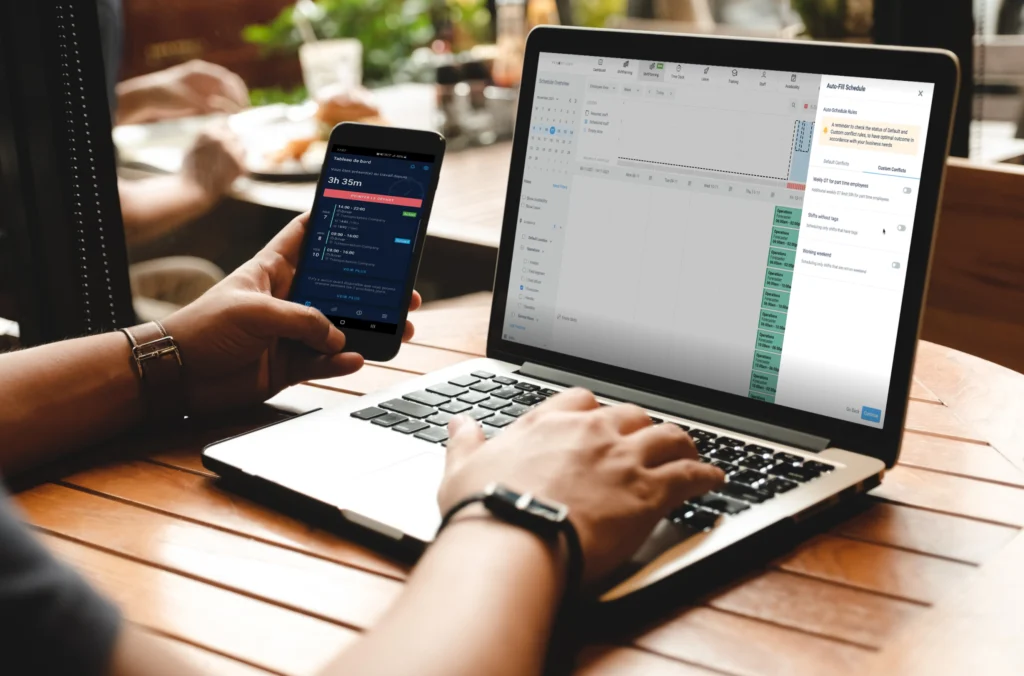
Employee time tracking is the method you use to record the hours worked by your staff. It’s essential for accurate payroll, labor law compliance, and efficient workforce management.
Accurately tracking employee hours is key to managing a workforce. Employee time tracking helps you simplify payroll, improve efficiency, and stay compliant with labor laws. Yet, many organizations still rely on outdated or manual processes, which often lead to costly mistakes, inefficiencies, and unnecessary stress for both employers and employees.
Whether you’re managing a small team or multiple roles within a large organization, tracking employee hours effectively is essential.
In this article, you’ll explore why time tracking matters, the main challenges, standard methods, benefits, and how automation can transform how you manage employee time.
What is employee time tracking?
Employee time tracking is the system your company uses to record work hours so you can compensate staff accurately. It involves three key components: logging time (clocking in and out), approving timesheets, and processing data for payroll and compliance.
Time tracking is a part of time and attendance, a broad category that also includes employee attendance tracking, time off tracking, billable hours, and employee scheduling.
Time entry
Commonly known as “clocking in and out” or “punching in and out,” time entry is the process of logging employees’ start times, end times, and unpaid breaks each day.
You can record these timestamps manually on a timecard or through digital tools like spreadsheets and employee time tracking software. Many systems now capture work hours automatically through employee logins and logouts.
Timesheet approvals
To keep payroll accurate and compliant, timesheet approvals are a critical step in the time tracking process. Managers verify timesheet accuracy before HR calculates total work hours, including overtime.
This can be done manually or through time tracking software.
Payroll & compliance
Payroll and labor compliance are a big part of time tracking, making sure employees are paid accurately and in line with labor laws and company policies. Effective time tracking helps payroll teams calculate wages, overtime, and deductions, maintains transparency, and reduces errors.
In addition, you need to maintain compliance with federal, state, and industry regulations around working hours, overtime pay, and record-keeping. Not complying can lead to legal trouble, expensive penalties, and employee disputes.
The difference between time tracking and attendance tracking
Time tracking is about recording the number of hours worked for payroll, while attendance tracking focuses on presence, absences, leave management, and punctuality.
Both are needed to keep your workforce organized and operations efficient, but they serve different purposes.
Attendance tracking is about policies and procedures for recording absences, employee leave, and on-time arrivals. Accurate attendance tracking can help spot patterns in absenteeism, enforce attendance policies, and keep the workforce available. It also helps managers plan staffing to reduce disruptions.
When you connect time tracking and attendance tracking, you get a complete picture of employee work habits. This helps make pay fair, supports compliance with labor laws, and improves workforce management.
The importance of employee time tracking
Understanding employee time and hours worked helps you optimize scheduling, avoid payroll errors, and manage labor costs. When you have an effective time and attendance tracking system, you stay compliant, control costs, and improve both the employee experience and operational efficiency.
Legal compliance and risk management
Complying with labor laws, company policies, and union agreements is one of the biggest reasons to use reliable time tracking. Since different places have specific rules for shift lengths, break times, and overtime, it’s important to know how your time tracking process keeps your organization compliant.
Failing to comply with these regulations can result in significant financial penalties. In 2024, organizations paid over $126 million in fines for violating the Fair Labor Standards Act (FLSA). With an effective attendance tracking system, you can stay compliant and avoid expensive legal issues.
Improves productivity
Effective time tracking gives you insights into employee performance, so managers can spot trends, inefficiencies, and bottlenecks. When employees understand their hours are tracked, they’re often more focused and more likely to meet deadlines.
Automated solutions also cut the administrative load on HR teams, letting them focus on bigger projects instead of hand-calculating time tracking spreadsheets. With instant analytics and reporting, you can make informed decisions that boost productivity and efficiency.
Reduces time theft
Time theft — such as buddy punching, extended breaks, and bad time entries — can cost you thousands of dollars annually. Automated solutions like biometric scanners, geofencing, and facial recognition help stop fraudulent clock-ins and make reporting more accurate.
Features like instant tracking and alerts for suspicious activities allow you to catch and prevent time theft, keeping pay fair and accountability high.
Supports workforce planning
Employee time tracking systems provide valuable data for scheduling and planning. Managers can optimize shift assignments, balance workloads, and help prevent employee burnout by watching for work hour trends.
With accurate attendance data, you can predict staffing needs for busy times and avoid spending on unneeded labor during slow periods.
Common methods of employee time tracking
You can use many methods to track time — from pen-and-paper logs to software, mobile apps, and biometric clocks. When choosing the right process, think about your organization’s size, industry, and team structure.
1. Traditional pen-and-paper logs
Some small companies still use manual timesheets. While this approach can work for just a few employees, it gets unreliable and error-prone as you grow. Manual entry leads to payroll errors and compliance issues, making this one of the least reliable options.
2. Online timesheets
Online timesheets, including spreadsheets, fix some errors that come with pen and paper. But they still ask employees to log their hours themselves, so mistakes or intentional time theft can slip in. Also, digital timesheets don’t give you instant workforce insights, so the payroll process can still drag on.
3. Biometric time clocks
Biometric time clocks, like fingerprint or face recognition, provide accurate and secure attendance tracking. These systems reduce “buddy punching” (when one employee clocks in or out for another) and support precise payroll numbers.
Biometric systems are great for organizations with on-site staff but may not suit remote or field employees. If you have a hybrid team, you might need mobile tracking options as well.
4. GPS tracking and geofencing
GPS tracking and geofencing are effective if you have mobile or field-based employees. These tools stop false time entries by confirming clock-ins only at approved job sites.
GPS tracking logs employee locations when they punch in. Geofencing forces clock-ins at specific sites, so you know they’re where they say they are. These features are particularly helpful for construction, home healthcare, and delivery roles that work across different locations.
5. Badge readers
Employees can wave or tap a badge at a device for quick, contactless clock-ins. This works well in high-traffic areas or places where employees shouldn’t touch terminals. Badge systems can also connect to building access control, tracking entry to secure spaces.
6. Web-based tools
A browser-based portal lets employees log hours from any desktop or laptop. Managers can review hours, handle exceptions, and approve shifts in a centralized dashboard. This solution is best for staff who work on computers throughout the day.
7. Mobile apps
Mobile solutions are key for remote or field workers.
Whether you’re at a construction site or a client’s office, a mobile app removes location barriers. Geofencing or geolocation ensures employees only clock in at approved sites. Apps can also send push notifications for missed punches or shift reminders.
8. Thermal sensors & health checks
Some organizations tie time tracking to health and safety.
For example, a thermal sensor might measure temperatures on clock-in to detect health risks. While not everyone needs this, it’s useful for industries where ongoing health checks are needed, or where people work in close quarters.
9. Automated time tracking software and apps
The most efficient way to track hours is through automated systems.
The best time tracking software gives you instant data collection, connects with payroll, offers custom reports and analytics, and more. Automated systems eliminate the errors of manual tracking, help maintain compliance, and improve employee satisfaction.
Challenges with employee time tracking
Implementing time tracking can come with hurdles like employee resistance, technical issues, and legal complexity, but clear communication and automated solutions can help you solve these. You need to tackle these challenges to make adoption smooth and get effective results.
| Challenge | How to solve it |
| Employee resistance | Employees can feel micromanaged by time tracking. Clear communication about the benefits for both them and the company helps build trust and get buy-in. |
| Technical issues | Tracking tools can have glitches, poor connectivity, or integration problems with other HR systems. A smooth rollout involves reliable software, proper training, and solid IT support. Cloud-based, mobile-friendly apps can also reduce technical headaches. |
| Inaccurate manual methods | Paper timesheets and spreadsheets are prone to errors, fraud, and inefficiency. Automated solutions that integrate with payroll and attendance cut down on human mistakes and boost accuracy. |
| Legal and compliance risks | Labor laws require careful hour tracking while respecting employee privacy. Stay current with local, state, and federal rules. A compliant tracking system with audit trails and automated reports can minimize risks. |
Employee time tracking by industry
Time tracking requirements change by sector, from complex grant tracking in higher education to managing seasonal schedules in retail.
No matter your field, tracking employee time effectively is key to keeping everything on track. From retail stores juggling part-time help to government agencies with strict compliance, every organization benefits from accurate time tracking.
Here’s how different industries use time tracking to meet their needs.
Higher education employee time tracking
Higher education includes multiple colleges and departments, with staff ranging from instructors to facilities and student workers. Higher education time tracking helps keep job codes straight, supports multi-location access, and syncs with payroll and scheduling for easier coordination.
Retail employee time tracking
Retail companies manage shifting schedules, seasonal hires, and part-timers. Accurate retail time tracking leads to fair pay, helps with staffing during busy periods, and supports smooth operations. Tracking data also lets you make smarter decisions on staffing, cut overtime expenses, and improve customer experience.
Hospitality employee time tracking
Hotels, restaurants, and event venues require structured scheduling to maintain service quality. Hospitality time tracking helps balance shifts, prevents burnout, and supports proper staffing levels. It also helps maintain compliance with industry-specific labor laws and helps organizations track employee overtime effectively.
Manufacturing employee time tracking
In manufacturing, exceptions can slow down productivity, so it’s important to know when employees work outside normal shifts. Good tracking lets you run reports to find exceptions, such as variances or extra overtime, so you can spot trends and monitor labor costs.
Government agency employee time tracking
Public sector organizations must stay accountable and follow compliance standards. Time tracking for government helps manage workloads and encourages fair pay. Regulations can be strict, making accurate time tracking critical for transparency and budget management.
Small businesses
With fewer employees, small businesses need efficient workforce management. Time tracking lets you allocate resources, manage labor costs, and improve productivity. Automated tracking lightens the load for business owners, freeing more time to focus on growth.
4 benefits of employee time tracking
Employee time tracking increases transparency, simplifies payroll, measures project ROI, and cuts HR admin work. Efficient time and attendance processes help create a well-organized and productive workplace.
Benefit 1: Boosts transparency and trust
Employees want to know they’re valued and paid fairly. A transparent, reliable time tracking system makes sure paychecks reflect actual hours, building trust between staff and management. Fair scheduling also improves job satisfaction and can help keep turnover down.
For example, in healthcare — where shift changes happen often — accurate time tracking prevents hours disputes and helps employees better manage their personal lives.
Benefit 2: Simplifies payroll and invoicing
Automated time tracking removes manual calculations for payroll and invoices. If you bill clients by the hour, accurate tracking reduces disagreements and improves financial reporting.
Connecting to your payroll system further reduces errors and cuts down on admin overhead.
Benefit 3: Helps in measuring ROI on projects
For project work, tracking employee time gives valuable data about project costs and profitability. You can analyze time spent, compare against budgets, and measure each project’s ROI.
These insights help managers allocate resources efficiently and make solid business decisions.
Benefit 4: Reduces administrative burden
Manual processes eat up HR time through collection, verification, and processing. Automated systems make this easier, so HR focuses on bigger challenges. By doing away with manual paperwork, you save time and operate more efficiently.
Best practices for employee time tracking implementation
To succeed, start simple, communicate clearly, train your team, and regularly review data to keep the process working.
Rolling out a time tracking process takes more than just a rule change. If you communicate well, set the right expectations, and give employees the training they need, you set yourself up for ongoing improvements.
Start simple
Start with a basic system, so employees don’t get overwhelmed.
For example, a small agency might use digital timesheets before switching to automated tracking as the team grows. Choosing an easy-to-use method builds compliance habits that make adopting new solutions easier in the future.
Communicate clearly
Be transparent to get employee buy-in. Explain why you’re implementing time tracking and how it benefits everyone.
For instance, a restaurant with rotating shift workers can show how time tracking leads to fair pay and fewer scheduling messes. Open communication reduces resistance and gets employees actively involved.
Train your team
Good training means employees use the system correctly.
If a construction business is rolling out GPS-based tracking, provide hands-on demos and clear written guides. Without training, you risk inaccurate records and employee frustration.
Review and optimize
Set aside time to review data often so you can find inefficiencies and improve workforce management.
A retail chain could use these insights to shift staffing as customer traffic changes. This way, you offer better service and avoid extra labor costs. Ongoing reviews help you get more value from your time tracking and stay adaptable.
Follow these best practices and you’ll implement a system that boosts efficiency, improves transparency, and supports a fair workplace. With purposeful execution, both managers and employees will see the value in time tracking, which leads to better compliance, higher productivity, and smoother operations.
Transform your employee time and attendance tracking process
An effective time capture process is key to your organization’s success. It’s the foundation for accurate, compliant time and attendance records. With the right system, you’ll cut down on payroll errors, improve morale, and get actionable data for stronger decisions.
When you invest in employee time tracking and follow best practices, you create a more engaged workforce and more efficient operations. Prioritizing this process puts your organization in a position for long-term success — helping both employees and managers gain efficiency, transparency, and control.
TCP Software’s employee scheduling, time, and attendance solutions are flexible and scalable to accommodate your business and employees as you grow.
From TimeClock Plus, which automates even the most complex payroll calculations and leave management requests, to Humanity Schedule for dynamic employee scheduling that saves you time and money, we have everything you need to meet your organization’s needs, no matter how unique. Plus, with Aladtec, we offer 24/7 public safety scheduling solutions for your hometown heroes.
Ready to learn how TCP Software takes the pain out of employee scheduling and time tracking? Speak with an expert today.